Filtering Large Code Systems
SNOMED CT, RxNorm, and ICD-10-CM contain far more codes than a form field, typeahead, or Questionnaire should expose directly. Binding to the full code system tends to surface the wrong codes: header codes next to billable diagnoses, drug ingredients next to prescribable products, or clinical findings mixed in with unrelated situations and qualifiers.
A scoped ValueSet fixes this. This guide covers the common case: filtering a CodeSystem you don't own, where you can read the
code system's data but can't modify the CodeSystem resource itself. You still create and own the ValueSet
— everything below works through $lookup and ValueSet.compose.filter, without needing write access to the
CodeSystem you're filtering.
If you're defining your own local codes instead, see Local Codes.
Step 1: Understand the code system
Hierarchy
A hierarchy is a parent-child relationship between codes, where the parent's meaning is a superset of the child's — every child is a more specific kind of its parent. In SNOMED CT, for example, Clinical finding contains Diabetes mellitus, which in turn contains Type 2 diabetes mellitus; selecting a parent implicitly covers everything beneath it. That is what lets one filter stand in for thousands of codes.
Check CodeSystem.hierarchyMeaning. Most clinical code systems (SNOMED CT, and most is-a trees) use
"is-a" — an is-a or descendent-of filter selects codes that are children of some parent code. Some code systems, like LOINC, have
no real hierarchy. For those, filter on properties or list codes explicitly instead.
Term types
Many code systems tag the role of a code separately from its position in the hierarchy, as a
CodeSystem.concept.property populated when the code system was imported. Two sibling codes can have very
different selectability:
- RxNorm uses
TTYforIN(ingredient),BN(brand name), andSCD/SBD(the actual prescribable drug concepts). The defaultMedicationRequest.medicationbinding includes all of these, so a prescriber typing a drug name sees ingredients and brand names mixed in with real orderable products. - ICD-10-CM has category codes (
Z01) above billable leaf codes (Z01.411). Filtering onproperty: tty, op: =, value: PT("Preferred Term") gets close to "billable codes only." - SNOMED CT leans on its hierarchy rather than a term-type property. Every concept lives under one of a
handful of top-level branches — Clinical finding (
404684003), Procedure (71388002), and Observable entity (363787002) among them — so scoping a filter to the right branch is what keeps unrelated concepts (procedures, body structures, qualifiers) out of, say, a findings picker. Which branch you want depends on your use case.
Check whether a system you're filtering has a usable property by calling
$lookup on a few sample codes and inspecting the returned
property list. Not every system carries one. If it doesn't, you can't add it yourself — that requires write
access to the CodeSystem resource, which you typically don't have for a shared or standard system. Fall back
to a hierarchy filter or an explicit code list instead (see Step 3).
Content completeness
CodeSystem.content (complete, fragment, or example) determines what $expand can return. If the
system only has a partial import (content: "fragment"), a filter can only match what was imported — it
silently returns nothing for codes outside that subset. If you need codes the current import doesn't have,
that's a question for whoever manages the import, not something a ValueSet filter can fix.
Step 2: Filter by hierarchy, by property, or both
ValueSet.compose.include.filter supports two kinds of filters. Multiple filters in one include block are
combined with AND. Both work read-only, against whatever hierarchy and properties the CodeSystem already
defines.
Hierarchy (property: "concept"):
is-a <code>— the code plus all descendants. Use when the parent itself is a selectable concept.descendent-of <code>— descendants only. Use when the parent is just an organizational label, and you want it excluded from the result.
For multiple, unrelated subtrees, add multiple include entries — entries combine with OR.
Property (property: "<property-code>"):
{ "property": "tty", "op": "=", "value": "PT" }
Combine both to say "this subtree, only this term type":
{
  "resourceType": "ValueSet",
  "status": "active",
  "url": "http://example.com/fhir/ValueSet/icd10-z01-billable",
  "compose": {
    "include": [
      {
        "system": "http://hl7.org/fhir/sid/icd-10-cm",
        "filter": [
          { "property": "concept", "op": "descendent-of", "value": "Z01" },
          { "property": "tty", "op": "=", "value": "PT" }
        ]
      }
    ]
  }
}
Step 3: Exclude header and non-selectable codes
FHIR has a concept for codes that are valid but shouldn't be offered as new selections: a notSelectable
property on the concept. ValueSet/$expand?excludeNotForUI=true strips these out of the result after
expansion — separate from compose.filter, which controls membership during expansion.
This only helps if the CodeSystem already marks concepts this way — check with $lookup before relying on
it. Setting notSelectable means editing the CodeSystem resource, which most default or shared code
systems (SNOMED CT, RxNorm, ICD-10-CM, and other systems already loaded into your project) don't give you
write access to.
If notSelectable isn't already populated, exclude header and category codes with the tools from Step 2
instead:
descendent-ofnaturally excludes the parent/header code from the result, with no property needed.- An existing term-type property (like
tty = PTon ICD-10-CM) is often a good substitute for "selectable."
Testing Your ValueSet
You can preview a ValueSet in app.medplum.com before wiring it into your
application. Open the ValueSet resource and go to the Preview tab.
Preview runs $expand against your filter, with a search box wired to the filter parameter — type into it
to confirm your compose.filter returns the codes you expect. This is the same query your application will
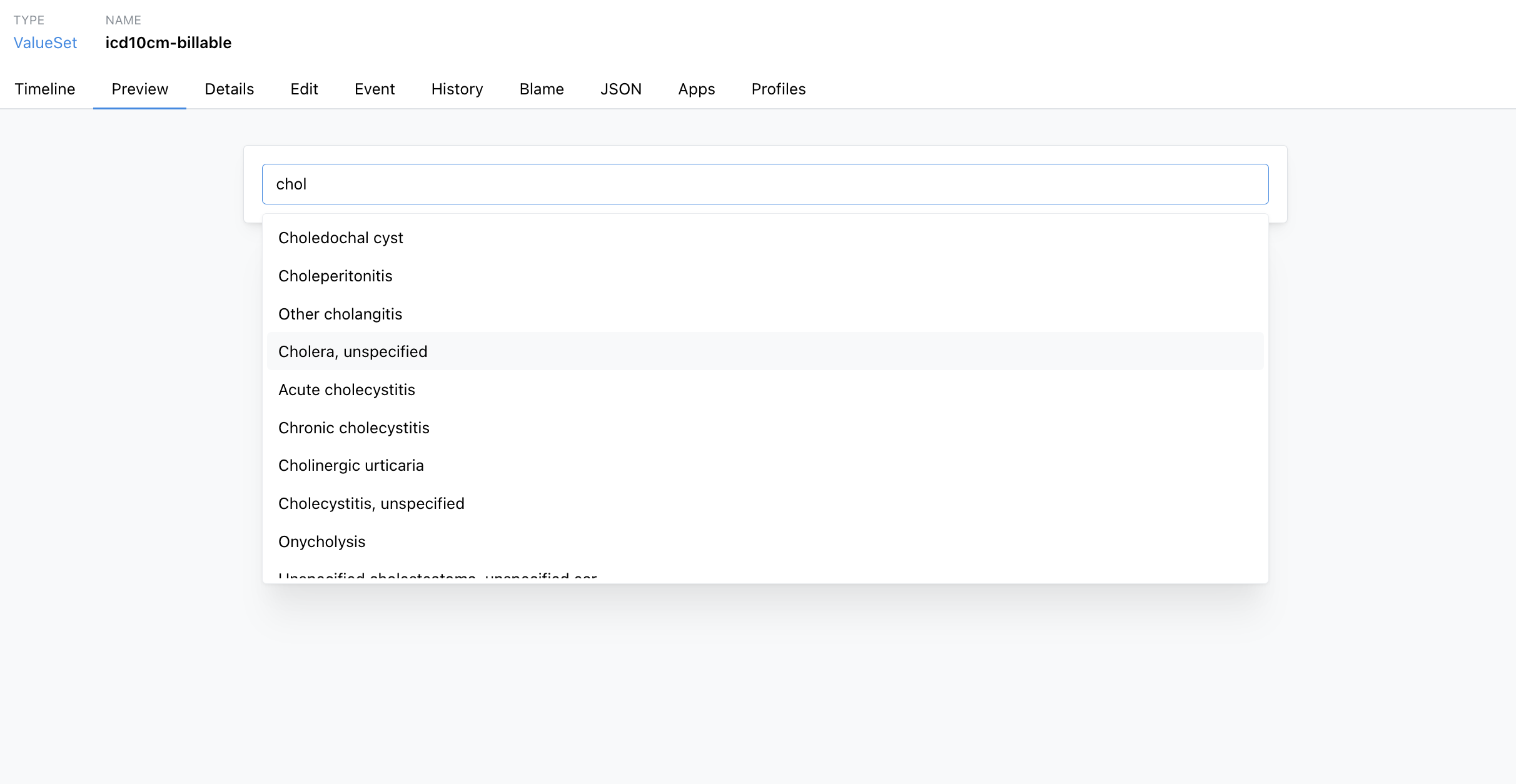
make, so it's a fast way to check a filter without writing any code. Several similarly-named codes can match
the same search term — searching chol against a billable ICD-10-CM ValueSet turns up cholera,
cholecystitis, and choledochal cyst side by side:
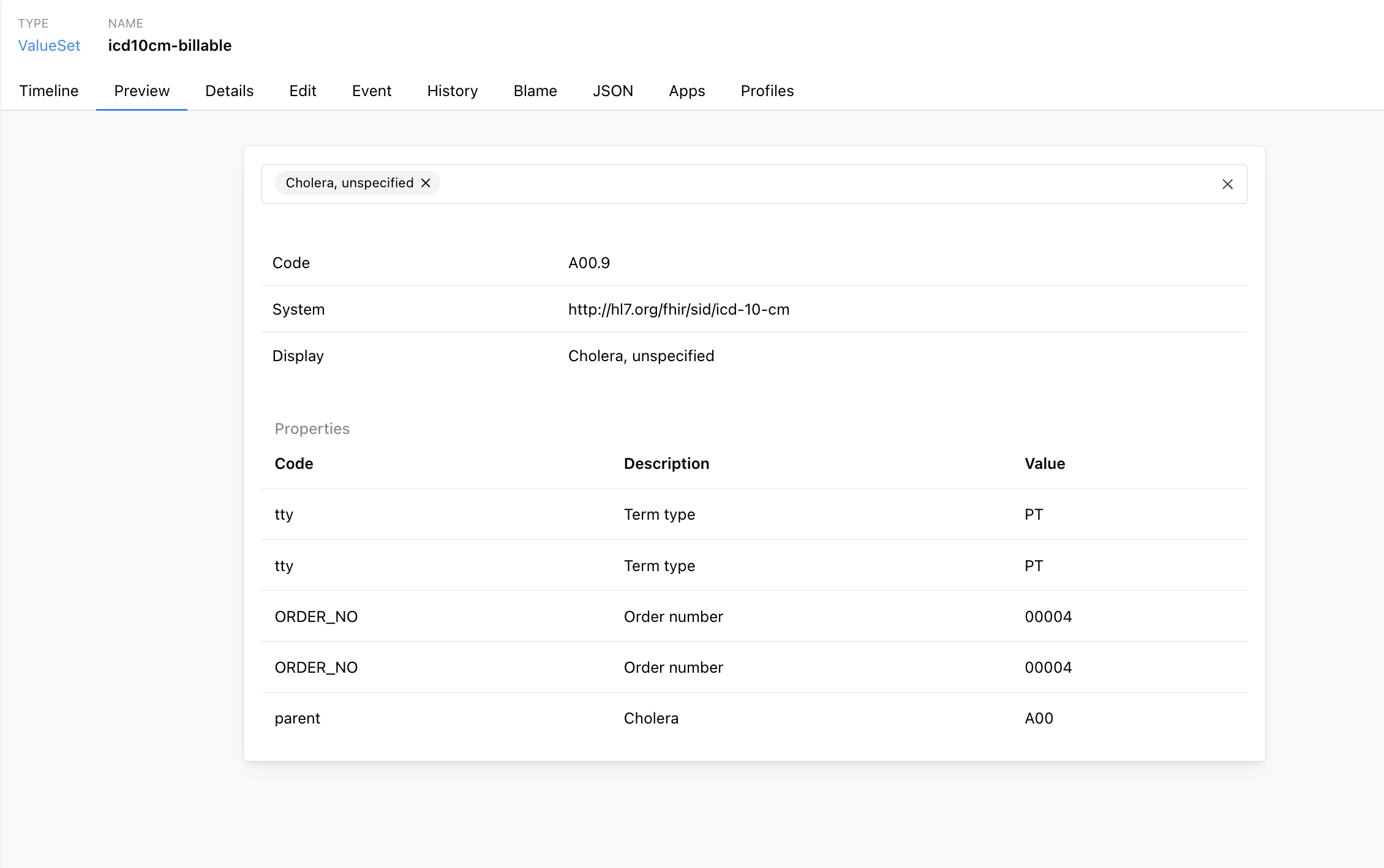
Selecting a result shows the underlying code, system, and any properties defined on that concept — useful for
confirming you're getting the concept you meant to, and for checking properties like tty before relying on
them in a filter: