Patient Records and Clinical Sharing
A care company may maintain common patient information across services, while independent practices may each maintain their own record for the same person. This page explains the two Patient models within one project. Start with shared Patient records or tenant-specific Patient records, then configure clinical access and accounts and sessions. For a separate project per tenant, see Projects.
The Tenancy Design Decision Guide compares shared and independently maintained Patient information, clinical sharing, and project boundaries.
One shared Patient record per person
Both tenants reference the same Patient. Updates to that resource change the information available to all authorized readers, including names, addresses, telecom, identifiers, contacts, and extensions. Decide which roles can update those fields and which source resolves conflicts. Field permissions and write constraints enforce those permissions; independently maintained values require a separate data model.
Patient information can itself be PHI. Demographics associated with receiving care can be protected health information under HIPAA even when visits and results remain separate. See the decision guide’s PII and PHI explanation and HHS guidance.
For example, two services use Patient/shared, while each service's Encounters have separate access restrictions. Correcting Patient/shared.telecom changes the common patient information even when the services cannot read each other's Encounters.
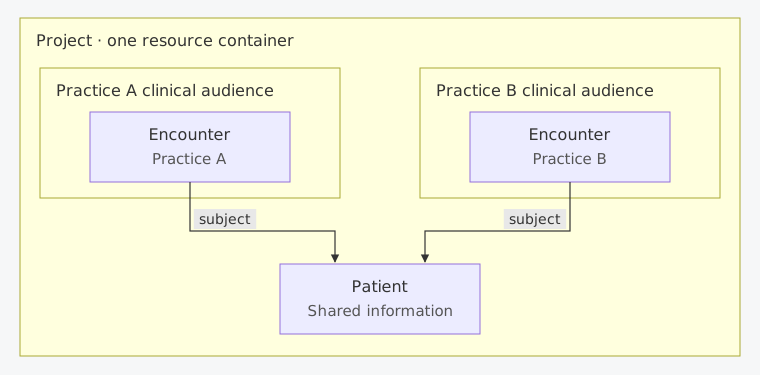 Scroll horizontally to view the full diagram.
Arrows show FHIR references. The service boxes show the intended clinical audiences; access policies enforce those audiences. Both services use the same Patient information.
A separate Patient record per tenant
Create a Patient for each tenant's relationship with the person. Each tenant's clinical resources reference its corresponding Patient. Updating one Patient leaves the other unchanged unless an explicit synchronization workflow updates it.
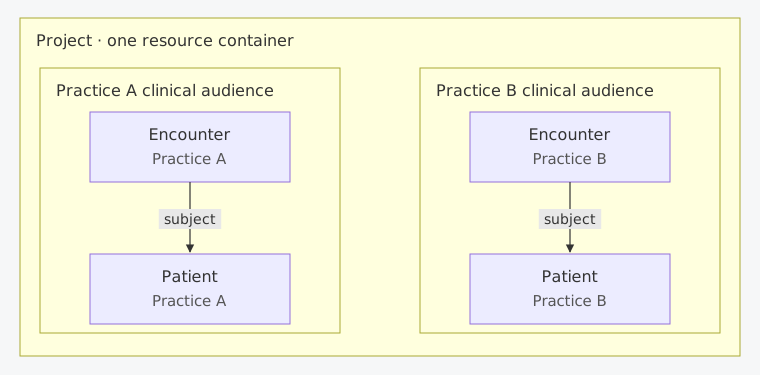 Scroll horizontally to view the full diagram.
Both Patients can represent the same person. Arrows show FHIR references; each practice's records are independently maintained and protected by its access policies.
These Patients are intentional independent records. Preserve that distinction during matching, imports, and deduplication. A platform identity mapping can connect the person to both records when authorized; it should not make either practice's data visible to the other.
Within each practice, use care-team access criteria if the API must limit clinicians to their assigned patients. A focused care-team view can use UI filters within broader permitted access, without tenant or care-team assignments in meta.compartment.
Provision the data before access
The steps below use tenant references in meta.accounts and the computed meta.compartment field within one project. First choose the tenant resource, such as Organization for a practice or HealthcareService for a service. $set-accounts sets its reference in meta.accounts; Medplum computes meta.compartment. The same mechanism applies to each tenant resource choice.
- Assign stable, tenant-specific identifier namespaces. A matching key must distinguish the tenant's record; email alone is insufficient.
- Use an identifier-based conditional create for each Patient, so retries reuse the intended record.
- Assign the Patient to its tenant using
$set-accounts, and confirm success before creating dependent resources or enabling tenant access. For a newly created Patient with no dependents, a propagation sweep is unnecessary. Keep provisioning credentials on a trusted backend;$set-accountsrequires project-admin or super-admin authority. Check the tenant references in the Patient'smeta.compartmentfield before granting ordinary tenant users access. - Reference that Patient from the tenant's clinical resources and enforce the corresponding tenant criteria in its staff policies.
- If the person needs portal access, provision the intended Patient profile explicitly using Identity, Memberships, and Sessions.
Patient.managingOrganization can represent the organization responsible for maintaining the record. Setting it alone does not populate the tenant references in meta.compartment used by the multi-tenant access pattern.
Clinical-record isolation
Sharing a Patient and sharing clinical records are separate choices. Define access for each clinical resource type, including resources with no reference that places them in a FHIR Patient compartment.
Shared clinical records
If the tenants intentionally share the Patient and the resources in its FHIR compartment, such as Observations and Tasks, use tenant enrollment with propagation. $set-accounts with propagate: true updates existing resources in the Patient's FHIR compartment. Ordinary writes of resources referring to the Patient can inherit its tenant accounts.
Separate clinical records with a shared Patient
Use resource-specific criteria that distinguish the clinical records, while granting access to the common Patient. Where a clinical field accurately represents the boundary, use its supported search parameter. The following example specifically models tenants as Organizations that are the Encounter's service provider. This read-only policy limits Encounters by both the authorized patient and service provider:
export const sharedPatientEncounters: AccessPolicy = {
  resourceType: 'AccessPolicy',
  name: 'Shared Patient, service-specific Encounters',
  resource: [
    {
      resourceType: 'Patient',
      criteria: 'Patient?_id=%patient.id',
      readonly: true,
    },
    {
      resourceType: 'Encounter',
      criteria: 'Encounter?patient=%patient&service-provider=%organization',
      readonly: true,
    },
  ],
};
Supply patient as a Patient reference and organization as the service-provider reference through ProjectMembership.access.parameter. The %patient.id placeholder uses the ID from that reference. For example, after storing the policy, use its returned ID and the actual Patient and Organization IDs in this grant:
export const sharedPatientGrant: ProjectMembershipAccess = {
  policy: { reference: 'AccessPolicy/shared-patient-encounters' },
  parameter: [
    { name: 'patient', valueReference: { reference: 'Patient/shared' } },
    { name: 'organization', valueReference: { reference: 'Organization/clinic-a' } },
  ],
};
Verify that the member is authorized for that Patient and organization before assigning the grant. Assign it to an ordinary non-admin membership without broader overlapping grants. This example grants only Patient and Encounter reads. Define the corresponding rules for every other resource type your workflow needs. An Observation's reference to an Encounter does not inherit that Encounter's policy; the Observation needs its own enforceable rule.
Encounter.serviceProvider references an Organization. A HealthcareService tenant or CareTeam access group needs its own supported resource criteria or account-assignment workflow; changing the reference type in this example does not implement that model.
Where clinical fields do not express the intended boundary, design a controlled resource-assignment workflow using $set-accounts and policies that match tenant references in meta.compartment. Cover both creation and later updates: ordinary clinical-resource writes can derive account assignments from the referenced Patient again. Keep all write paths consistent, including Bots and imports. Initial writes must obey the intended boundary; an asynchronous correction after a resource becomes readable can expose it to the wrong tenant.
A trusted backend with project-admin or super-admin authority can set meta.accounts during creation or update using extended mode. This sets the intended accounts in the same write, overriding Patient-account inheritance for that write. Follow the metadata handling requirements on that page for every subsequent write.
Patient-wide tenant assignment is a sharing operation. Adding both organizations to a Patient and filtering all clinical resources only by the inherited organization references in meta.compartment grants both organizations access. Setting propagate: false only skips the existing-resource sweep; it does not disable inheritance on later writes. Test the intended separation after creation, editing, and reassignment.
For files, choose a Binary.securityContext whose access matches the file's intended audience. A tenant-specific file linked to a shared Patient as its security context may become accessible to both tenants. See Binary Security Context.
Accounts and sessions
Your Patient model does not determine whether people need one account or several. Implement one account with separate practice sessions, one account with access across practices, or independent practice accounts in Identity, Memberships, and Sessions, which contains the resource diagrams and provisioning steps.
Enrollment and transfers
Assign tenants with $set-accounts, providing the complete intended account list. Choose propagation according to the agreed historical-record behavior:
| Intended result | Implementation |
|---|---|
| Share a Patient and its chart with another tenant | Include the additional tenant and propagate to existing resources in the Patient's FHIR compartment, such as Observations and Tasks. |
| Transfer records in the Patient's FHIR compartment to another tenant | Replace the tenant assignment and propagate; verify completion and any other grants before treating old access as revoked. |
| Share Patient information while keeping historical clinical records separate | Maintain resource-specific clinical rules; a patient-wide propagation sweep does not distinguish historical and future records. |
| Enroll the person in another practice with an independent Patient | Provision the second tenant's Patient and membership. Retain the original record and its access according to the agreed lifecycle. |
For tenant-specific Patients, share selected records through an explicitly authorized workflow. Replacing the Patient on existing clinical resources or merging Patients can change their FHIR Patient compartment membership, the references in meta.compartment, and access.
Verify the boundary
Exercise the design with ordinary tenant and patient credentials:
- Update a Patient field and verify the agreed shared or independent behavior.
- Read and search another tenant's clinical resources directly, including after an allowed update or import.
- Check file access against the file's security context.
- Enroll the same person in a second tenant and verify the intended Patient and membership are selected.
- Check which records remain accessible after a transfer or membership revocation, including existing sessions.
Next: Configure Tenant Assignment and Access, Access Policies, and Identity, Memberships, and Sessions for the selected model.