Claim Responses (277 / 835)
This guide explains how Medplum ingests Stedi inbound claim responses — 277CA claim acknowledgments and 835 Electronic Remittance Advice (ERA) — and how to set up the two delivery paths: webhooks (the primary, near-real-time path) and an optional poller (a catch-up safety net).
This workflow is handled by the Stedi claim-response bots. Please contact the Medplum team to get access to these bots.
Overview
After you submit a professional claim, payers respond asynchronously:
| Response | X12 | Meaning |
|---|---|---|
| Claim acknowledgment | 277CA | The clearinghouse/payer accepted or rejected the claim for processing |
| Remittance / payment | 835 ERA | Adjudication and payment details for the claim |
Stedi notifies you when a response is ready. The notification delivers only a transactionId — Medplum then fetches the full report from Stedi's 277 report or 835 report APIs (and, for 835, the ERA PDF).
Storage model
Reports are stored with minimal translation. Each report is saved verbatim as a DocumentReference:
- No ClaimResponse or PaymentReconciliation resources are created from the response, and no adjudication/payment fields are mapped. Downstream consumers parse the stored report JSON as needed.
- As a convenience, when a matching
ClaimResponsealready exists (from claim submission), the reportDocumentReferenceis best-effort linked back to it via an extension (see ClaimResponse linking).
Bots and operations
| Bot identifier | Operation | Role |
|---|---|---|
stedi-claim-response-webhook | $stedi-claim-response-webhook | Receives Stedi transaction.processed.v2 deliveries. In production Stedi calls it directly via its identifier-based $execute URL; the operation is provided for manual replay/testing |
stedi-claim-response-poller | $stedi-poll-responses | Catch-up: polls Stedi for inbound 277/835 transactions missed by the webhook |
install-stedi | $stedi-install | One-time setup: creates the webhook ClientApplication, prints the webhook URL, and optionally sets project secrets |
All three bots read the project secret STEDI_CLAIM_API_KEY (the same key used for claim submission).
What gets stored
| Transaction | DocumentReference(s) created |
|---|---|
| 277 | One DocumentReference (application/json) containing the raw 277 report |
| 835 | One DocumentReference (application/json) containing the raw 835 report, plus (best-effort) one DocumentReference (application/pdf) for the ERA PDF |
Each stored DocumentReference carries these identifiers:
| System | Value |
|---|---|
https://www.stedi.com/transactions/inbound | The inbound Stedi transaction id (the ERA PDF uses <transactionId>/pdf) |
https://www.stedi.com/response-type | 277 or 835 |
https://www.stedi.com/events | The originating webhook event id (present only when delivered via webhook) |
ClaimResponse linking
The submit-claim bot stamps the patient control number (X12 CLM01) onto the Claim as an identifier with system https://www.stedi.com/patient-control-number. The payer echoes that same value back on the 277/835, so the claim-response flow can correlate an inbound report to the originating Claim and its ClaimResponse.
When a match is found, a flat extension is added to the ClaimResponse referencing the stored report DocumentReference:
| Transaction | Extension URL on ClaimResponse |
|---|---|
| 277 | https://www.stedi.com/fhir/StructureDefinition/claim-response-277-report |
| 835 | https://www.stedi.com/fhir/StructureDefinition/claim-response-835-report |
Linking is best-effort: if the control number, Claim, or ClaimResponse cannot be found, the report is still stored in full as a DocumentReference — no data is lost. A single claim per transaction is assumed (only the first control number found in a report is correlated), which matches how claims are submitted (one Claim per Stedi transaction).
Idempotency
Processing is idempotent on the Stedi inbound transactionId (not the webhook event.id). Before fetching a report, the flow checks whether a DocumentReference already exists with identifier https://www.stedi.com/transactions/inbound|<transactionId>; if so, the transaction is skipped.
This makes it safe for the webhook and the poller to overlap — re-processing the same transaction is a no-op — and safely ignores webhook replays delivered with a new event.id.
Setting up webhooks
Webhooks are the primary, near-real-time delivery path. Setup follows four steps: run the install bot, grab the client credentials it creates, create the webhook in Stedi, and add the transaction-processed event binding.
Step 1 — Run the Stedi Install bot in your own project
As a project admin, invoke the $stedi-install operation at the base of your project. This runs the Stedi Install bot, which creates a ClientApplication that Stedi uses to authenticate its webhook calls and prints the exact webhook URL to configure. You can optionally set the Stedi project secrets at the same time (any omitted secret is left untouched, so this is safe to re-run):
POST {base}/fhir/R4/$stedi-install
Content-Type: application/fhir+json

{
  "resourceType": "Parameters",
  "parameter": [
    { "name": "STEDI_CLAIM_API_KEY", "valueString": "<YOUR_STEDI_CLAIM_API_KEY>" },
    { "name": "STEDI_INSURANCE_API_KEY", "valueString": "<YOUR_STEDI_INSURANCE_API_KEY>" }
  ]
}
The operation is idempotent — re-running it does not create duplicate clients. It returns an OperationOutcome whose text summarizes:
- Whether the webhook
ClientApplicationwas created or already existed - Which secrets (if any) were set
- The webhook URL to configure in Stedi
- Next-step instructions
The claim-response bots are deployed once in a shared, Medplum-owned project and linked into your project. They run with runAsUser, so when Stedi invokes the webhook as your project's ClientApplication, the bot executes in — and writes DocumentReference resources into — your project. No ProjectMembership is created for the shared bots.
Step 2 — Grab the client credentials from the new Client Application
Step 1 creates (or reuses) a ClientApplication named "Stedi Webhook Handler Client" in your project. Open it in the Medplum app (Admin → Client Applications) and copy its credentials — you'll enter them as the Stedi webhook's Basic Auth username and password:
| Basic Auth field | Value |
|---|---|
| Username | The ClientApplication id (the client id returned by $stedi-install) |
| Password | The ClientApplication secret |
For security, $stedi-install does not print the client secret (the operation outcome is captured in an AuditEvent). Copy the secret directly from the ClientApplication in the Medplum app.
Step 3 — Create the webhook in Stedi
In the Stedi portal, go to Webhooks → Create webhook and configure the destination:
-
Method:
POST -
HTTPS URL — use the identifier-based
$executeURL exactly as the install operation prints it. Theidentifierquery value is the fullsystem|valuepair, URL-encoded, so the URL is stable across deployments and projects:https://api.medplum.com/fhir/R4/Bot/$execute?identifier=https%3A%2F%2Fwww.medplum.com%2Fbots%7Cstedi-claim-response-webhookThis resolves the webhook bot by its stable identifier
https://www.medplum.com/bots|stedi-claim-response-webhook. Prefer copying the URL from the install output over typing this example by hand. -
Credential set — create a credential set that sends the Step 2
ClientApplicationid and secret as HTTP Basic Auth.
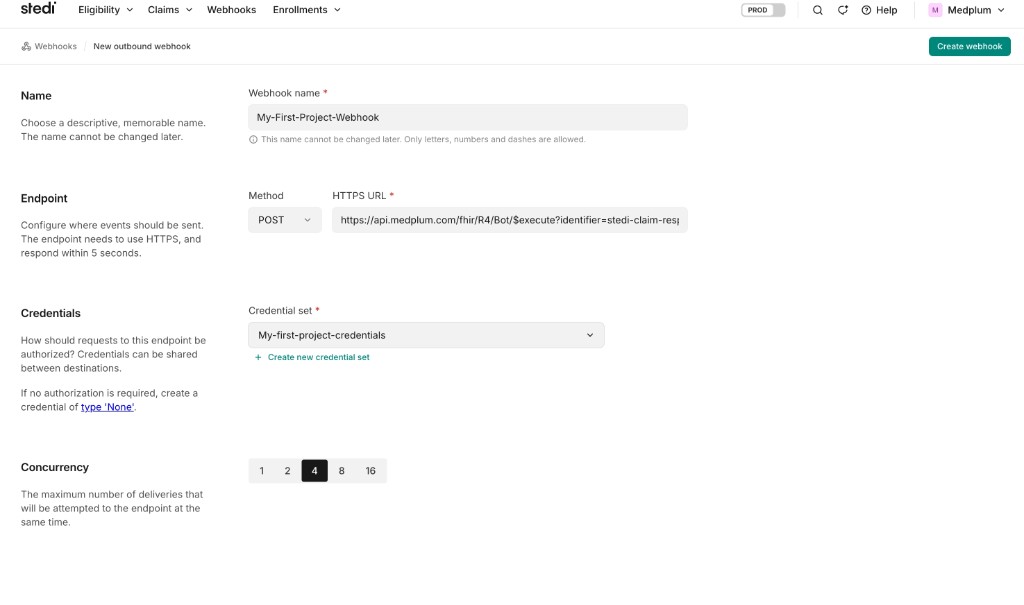
Stedi requires the endpoint to respond within 5 seconds. The webhook bot acknowledges quickly and processes the report in the same invocation.
Step 4 — Add the Transaction processed event binding
On the webhook you just created, add an event binding and choose the Transaction processed event type — this is Stedi's transaction.processed.v2 event, emitted when an individual EDI transaction (such as an inbound 277 or 835) is processed. You can leave the optional Direction / Transaction Set / Partnership filters blank; the bot already ignores outbound and non-277/835 transactions.
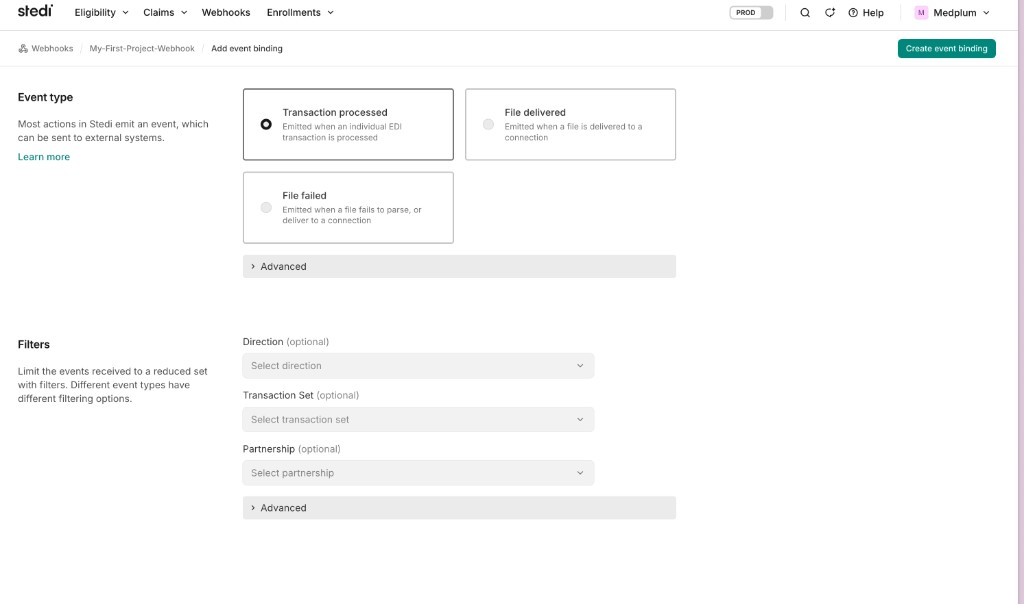
Save the binding. Stedi will now POST claim responses to the URL. The webhook bot parses each event, ignores outbound (our own 837) and non-277/835 transactions, fetches the report, and stores it as a DocumentReference in your project.
Webhook payload
Stedi delivers a transaction.processed.v2 event. Medplum handles both the bare envelope and the event-wrapped shape, and reads the transaction set identifier from its nested location (falling back to the legacy top-level field):
{
  "detail-type": "transaction.processed.v2",
  "id": "8a9fc08a-24b2-4eeb-af7c-f96376ea471e",
  "detail": {
    "transactionId": "7647d644-9348-4596-a3b4-6830b8b48cc8",
    "direction": "INBOUND",
    "x12": {
      "metadata": { "transaction": { "transactionSetIdentifier": "277" } }
    }
  }
}
Only inbound 277/835 transactions are processed; outbound transactions (e.g. your submitted 837) are ignored.
Manual replay / testing
To replay or test a webhook event without Stedi calling in, invoke the type-level operation with the raw Stedi event JSON as the request body:
POST {base}/fhir/R4/ClaimResponse/$stedi-claim-response-webhook
Content-Type: application/json

{ "detail-type": "transaction.processed.v2", "detail": { "transactionId": "…", "x12": { "metadata": { "transaction": { "transactionSetIdentifier": "835" } } } } }
Polling (catch-up)
The poller is an optional safety net that backfills any responses the webhook missed. It polls Stedi's Poll Transactions API for INBOUND 277/835 transactions since the last checkpoint and stores each report the same way the webhook does. It is idempotent on the inbound transaction id, so it never double-stores a report the webhook already ingested.
Running the poll operation
Invoke $stedi-poll-responses at the type level. It takes no input:
POST {base}/fhir/R4/ClaimResponse/$stedi-poll-responses
const result = await medplum.post(
  medplum.fhirUrl('ClaimResponse', '$stedi-poll-responses')
);
The operation returns a summary of the run:
{
  "ok": true,
  "since": "2026-06-24T00:00:00.000Z",
  "checkpoint": "2026-07-01T17:05:00.000Z",
  "processedCount": 3,
  "skippedCount": 12
}
| Field | Meaning |
|---|---|
since | Start of the poll window (the previous checkpoint) |
checkpoint | New checkpoint timestamp, captured before fetching so transactions arriving mid-run are not skipped next time |
processedCount | Inbound 277/835 transactions newly stored on this run |
skippedCount | Transactions skipped (already processed, or not inbound 277/835) |
Checkpoint
The poller stores its checkpoint on a Basic resource:
- Identifier:
https://www.stedi.com/poller|stedi-claim-response-poller - Checkpoint value: extension
https://www.stedi.com/fhir/StructureDefinition/poller-last-run(valueDateTime)
On the first run — before any checkpoint exists — the poll window defaults to a 7-day lookback.
Scheduling
Scheduling the poller is left to you. Medplum cron is bound to the Bot resource and runs in the bot's home project, so scheduling cron on a shared poller bot would not poll each customer project. To automate catch-up, deploy and schedule the poller in your own project, where its cron executes in that project's context. Otherwise, invoke $stedi-poll-responses on demand (for example, from your own scheduled job).
Querying stored reports
Stored reports are DocumentReference resources, searchable by the identifiers above:
GET {base}/fhir/R4/DocumentReference?identifier=https://www.stedi.com/response-type|277
GET {base}/fhir/R4/DocumentReference?identifier=https://www.stedi.com/response-type|835
GET {base}/fhir/R4/DocumentReference?identifier=https://www.stedi.com/transactions/inbound|<transactionId>
When a report was linked to a ClaimResponse, you can also reach it from the ClaimResponse extension (…/claim-response-277-report or …/claim-response-835-report).
Test workflow
Use Stedi's test claims workflow: submit a claim to payer STEDITEST using a Stedi test API key (prefix test_) as STEDI_CLAIM_API_KEY. Stedi generates test 277CA and 835 responses that you can ingest via either the webhook or $stedi-poll-responses.
Limitations
- Professional (837P) claims only
- Reports are stored verbatim as
DocumentReference— noClaimResponse/PaymentReconciliationmapping (only a best-effort link to an existingClaimResponse) - No
file.failed.v2alerting - No Real-Time Claim Status (276/277) API
- Provider UI status display is not included (query the stored
DocumentReferenceresources from your app)