Sync a Provider
Before a prescriber can use ScriptSure, they must have a ScriptSure user account linked to their Medplum ProjectMembership. There are two ways to accomplish this:
| Approach | Bot | Best for |
|---|---|---|
| Invite flow | scriptsure-provider-invite-bot | Provider self-enrolls via a pre-populated sign-up link |
| Admin sync | scriptsure-provider-sync-bot | Bulk onboarding or re-syncing existing providers |
Both bots will look up the Practitioner resource by id, and require the Practitioner to have at minimum: name (given + family), an email telecom, and an NPI identifier (system: "http://hl7.org/fhir/sid/us-npi"). DEA and state license are also read when present.
Practitioner resource
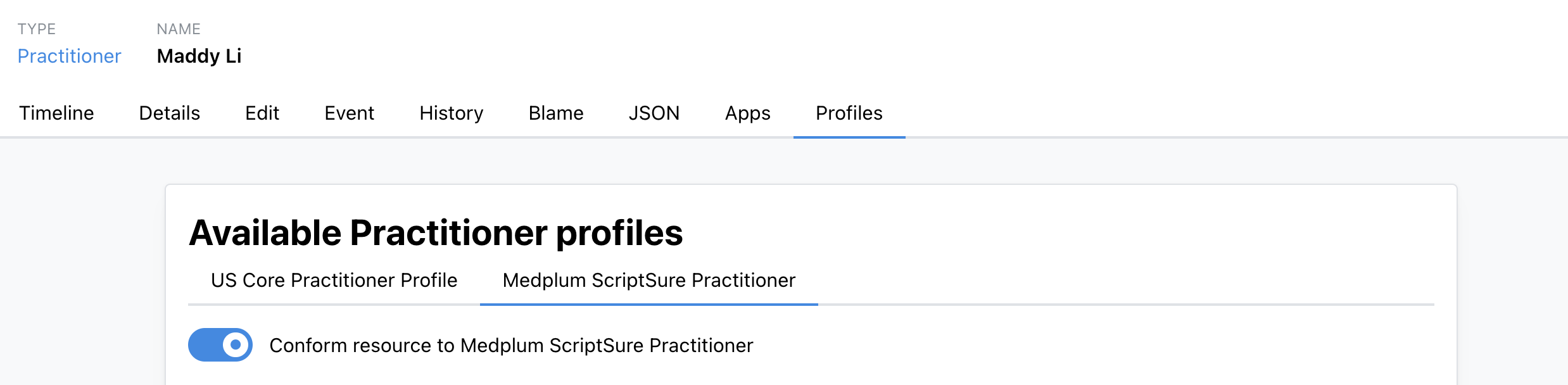
Use the MedplumScriptSurePractitioner profile when creating or editing prescriber Practitioner resources. The profile can be applied via API, or added using the Practitioner's Profiles Tab in the UI.
| Field | Where to enter | Example |
|---|---|---|
telecom[system=email] | jane.doe@clinic.example | |
| NPI | identifier with system: http://hl7.org/fhir/sid/us-npi | 1234567890 |
| DEA | identifier with system: http://terminology.hl7.org/NamingSystem/usDEA | AF1234567 |
| State license | qualification[].identifier[] — set system to the state OID (urn:oid:2.16.840.1.113883.4.3.{stateFips}), value to the license number, and type.coding to v2-0203 (MD, SL, RN, etc.) | California (06): urn:oid:2.16.840.1.113883.4.3.6 |
DEA and state license are optional, but when present they pre-fill the ScriptSure invite enrollment form via scriptsure-provider-invite-bot.
Example Practitioner
{
  "resourceType": "Practitioner",
  "meta": {
    "profile": [
      "https://medplum.com/profiles/integrations/scriptsure/StructureDefinition/MedplumScriptSurePractitioner"
    ]
  },
  "name": [{ "given": ["Jane", "Marie"], "family": "Doe", "suffix": ["MD"] }],
  "telecom": [{ "system": "email", "value": "jane.doe@clinic.example" }],
  "identifier": [
    { "system": "http://hl7.org/fhir/sid/us-npi", "value": "1234567890" },
    { "system": "http://terminology.hl7.org/NamingSystem/usDEA", "value": "AF1234567" }
  ],
  "qualification": [
    {
      "code": { "text": "California Medical License" },
      "identifier": [
        {
          "system": "urn:oid:2.16.840.1.113883.4.3.6",
          "value": "A12345",
          "type": {
            "coding": [
              {
                "system": "http://terminology.hl7.org/CodeSystem/v2-0203",
                "code": "MD",
                "display": "Doctor of Medicine"
              }
            ]
          }
        }
      ]
    }
  ],
  "extension": [{ "url": "http://hl7.org/fhir/StructureDefinition/timezone", "valueCode": "US/Eastern" }]
}
The final segment of the state-license OID is the state FIPS code—for example, California is 6 (urn:oid:2.16.840.1.113883.4.3.6) and Washington is 53 (urn:oid:2.16.840.1.113883.4.3.53). Set this on qualification[].identifier.system.
Invite flow: scriptsure-provider-invite-bot
Generates a pre-populated ScriptSure sign-up URL. Send it to the provider–they complete registration in ScriptSure, and a webhook automatically stores their ScriptSure user ID on their ProjectMembership when done.
const result = await medplum.executeBot(
  { system: 'https://www.medplum.com/bots', value: 'scriptsure-provider-invite-bot' },
  { practitionerId: 'abc123' }
);
// { status: 'invite_generated', inviteUrl: 'https://...', practitionerEmail: '...' }
// status may also be: 'invite_pending' | 'already_enrolled' | 'synced'

if (result.status === 'invite_generated') {
  await sendEmail(result.practitionerEmail, result.inviteUrl);
}
Admin sync: scriptsure-provider-sync-bot
Creates or updates the provider in ScriptSure directly via the admin API–no invite link required. Use for bulk onboarding or re-syncing after profile changes.
const result = await medplum.executeBot(
  { system: 'https://www.medplum.com/bots', value: 'scriptsure-provider-sync-bot' },
  { practitionerId: 'abc123', activate: true, register: true }
);
// { status: 'created' | 'updated' | 'synced', scriptSureUserId: 55555, spi: '...' }
register: true enrolls the provider on SureScripts for electronic prescribing.
Supporting (non-prescriber) users
Staff users—MAs, care coordinators, and other non-prescribers—can be enrolled in ScriptSure using the same scriptsure-provider-sync-bot by passing prescriber: false. The bot creates the account with userType: 'Staff' and skips SureScripts registration.
const result = await medplum.executeBot(
  { system: 'https://www.medplum.com/bots', value: 'scriptsure-provider-sync-bot' },
  { practitionerId: 'abc123', prescriber: false, activate: true }
);
// { status: 'created' | 'updated' | 'synced', scriptSureUserId: 55555 }
The bot still requires the user to be a Practitioner resource in Medplum with a ProjectMembership and an email telecom. NPI is not required for staff users—pass an empty string or omit it from the Practitioner resource.
Staff users can search pharmacies and set a patient's preferred pharmacy. They cannot send prescriptions.