Results Display Requirements
Performing labs such as Quest and Labcorp have a minimum set of requirements for how results are displayed in the applications that receive them. This guide describes best practices for remaining compliant when showing results received through the Medplum Health Gorilla integration.
Use the certified component
Display requirements are not standardized across labs and may be reviewed during an audit. Using Medplum's certified LabOrdersPanel component from @medplum/react is the safest way to ensure your application meets them.
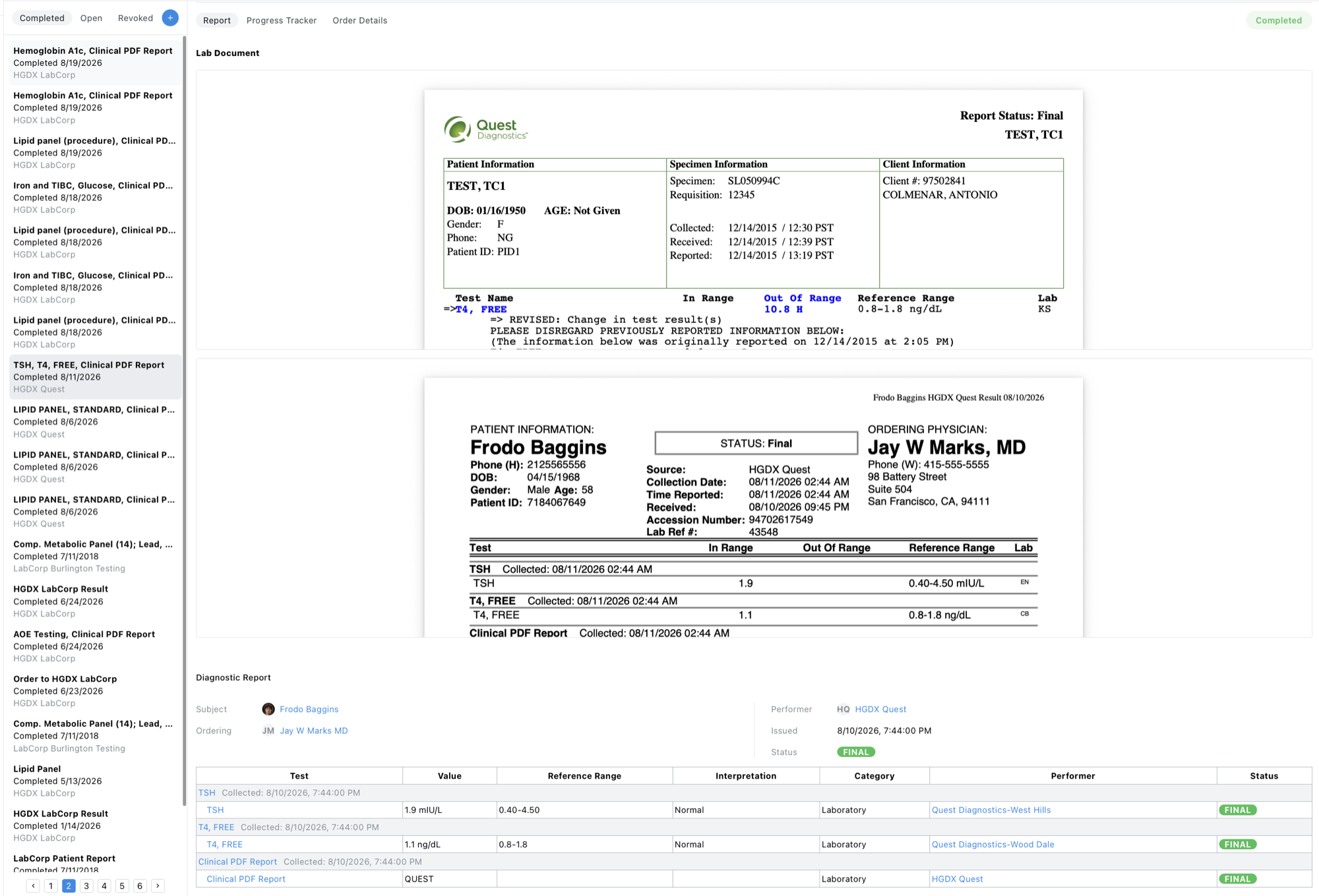
What the certified component displays
LabOrdersPanel displays each result in full from the resources created by the integration. See Receiving Results for the underlying data model.
| Element | Source | Details |
|---|---|---|
| Health Gorilla PDF report | DiagnosticReport.presentedForm | Standardized report in a format that is consistent across all performing labs |
| Performing lab PDF report | Observation.derivedFrom on the "clinical lab report" result | The lab's original report, such as the Quest or Labcorp branded PDF |
| Structured results | DiagnosticReport.result | Each result's test name, value and units, reference range, interpretation, notes, performing lab, and status, shown with DiagnosticReportDisplay |
| Report details | DiagnosticReport | Patient, ordering provider, issued and collected dates, and report status (preliminary, final, corrected, etc.) |
| Performing lab details | Organization | Lab name, address, and lab director |
| Orders sidebar | ServiceRequest, DiagnosticReport | Completed, Open, and Revoked orders with their status |
Using the certified component
If you use the Medplum Provider app, the Orders page already uses LabOrdersPanel, and no changes are needed.
For custom applications, render LabOrdersPanel where clinicians review lab results:
import { LabOrdersPanel } from '@medplum/react';

<LabOrdersPanel
  patient={patient}
  search={search}
  activeTab={activeTab}
  selectedId={selectedId}
  getItemUri={getItemUri}
  onChange={onChange}
  completedUri={completedUri}
  openUri={openUri}
  revokedUri={revokedUri}
/>;
The component does not handle routing. Your application derives the search, active tab, and selected item from the URL. See the Provider Orders page for a complete implementation.
Requirements
- Use
LabOrdersPanelas the primary results view in your application. Clinicians must use it for clinical and diagnostic decisions. - Keep the component intact. Place it anywhere in your layout, but do not fork it, hide sections, or filter out results.
- Preserve result data. Do not edit result values or delete the PDF
DocumentReferenceresources. Corrections come from the performing lab as updated reports.
Related Reading
- Receiving Results - the FHIR resources behind each displayed result
- Orders (Labs & Imaging) - reviewing results in the Medplum Provider app
- LabOrdersPanel Storybook - interactive example of the certified component
- Health Gorilla: Displaying Orders and Results - Health Gorilla's general display guidance