Payer Directory
Use the candid-get-payers bot to search Candid Health's payer directory or retrieve a payer by its Candid UUID. The bot calls Candid's payers.v4 API and returns FHIR Organization resources with payer identifiers and clearinghouse support information.
Prerequisites
The candid-get-payers bot must be deployed and available to your Medplum project. Please contact the Medplum team to get access to this integration.
The bot uses these project secrets:
| Secret | Description |
|---|---|
CANDID_CLIENT_ID | Candid Health API client ID |
CANDID_SECRET_ID | Candid Health API secret |
CANDID_BASE_URL | Candid API base URL, such as https://api-staging.joincandidhealth.com for staging |
The examples below assume an authenticated medplum client. Set payerBotId to the Medplum resource ID of your deployed candid-get-payers Bot.
Search Payers
Invoke the bot with executeBot and a JSON input:
import type { Organization, Parameters } from '@medplum/fhirtypes';

const payerBotId = '<candid-get-payers-bot-id>';
const result: Parameters = await medplum.executeBot(payerBotId, {
  searchTerm: 'AETNA',
  limit: 20,
});

const payers = (result.parameter ?? [])
  .filter((parameter) => parameter.name === 'organization')
  .map((parameter) => parameter.resource as Organization);

const nextPageToken = result.parameter?.find((parameter) => parameter.name === 'nextPageToken')?.valueString;
Input Fields
All input fields are optional. Pass {} to request an unfiltered page of payers.
| Field | Type | Description |
|---|---|---|
payerUuid | string | Fetch a single payer by its Candid UUID. When set, takes precedence over all search fields. |
searchTerm | string | Search term forwarded to Candid's payer directory. |
limit | number | Requested page size. If omitted, Candid's default applies. |
pageToken | string | Continuation token returned by a previous search. |
Search Response and Pagination
A search returns a FHIR Parameters resource with:
- One
organizationparameter per payer, containing the payer Organization inparameter.resource. - A
nextPageTokenparameter with avalueStringwhen another page is available.
An empty search result has no organization parameters. To fetch the next page, pass the returned token with the same search criteria:
if (nextPageToken) {
  const nextPage: Parameters = await medplum.executeBot(payerBotId, {
    searchTerm: 'AETNA',
    limit: 20,
    pageToken: nextPageToken,
  });
}
Repeat until the response has no nextPageToken.
Fetch a Single Payer
Use a Candid payer UUID from a directory result to retrieve one payer. This returns an Organization directly, rather than a Parameters resource.
const payerUuid = '<candid-payer-uuid>';
const payer: Organization = await medplum.executeBot(payerBotId, { payerUuid });
The Candid payer UUID is distinct from both a claims payer ID and a Medplum Organization resource ID.
Payer Organization Fields
The bot maps each directory entry to an Organization with active: true and an organization type of pay (Payer).
| Field | Mapping |
|---|---|
name | Candid payer name |
alias | Alternate payer names, when present |
address | Payer street address, when present |
identifier | Candid UUID and capability-specific payer IDs listed below |
type | Payer type, plus Candid's payer category when present, using system https://www.joincandidhealth.com/payer-category |
extension | Clearinghouse support summaries for eligibility, professional claims, and remittance |
Payer Identifiers
| Identifier | System | Included |
|---|---|---|
| Candid payer UUID | https://www.joincandidhealth.com/payer-uuid | Always |
| Claims payer ID | https://www.joincandidhealth.com/chc-payerid | Always |
| Eligibility payer ID | https://www.joincandidhealth.com/eligibility-payerid | When supplied by Candid |
| Remittance payer ID | https://www.joincandidhealth.com/remittance-payerid | When supplied by Candid |
Keep these identifier systems when saving payer Organizations so downstream integrations can resolve the payer correctly.
Clearinghouse Support
Each support extension has a valueCode:
| Capability | Extension URL |
|---|---|
| Eligibility | https://candidhealth.com/fhir/StructureDefinition/eligibility-support |
| Professional claims | https://candidhealth.com/fhir/StructureDefinition/professional-claims-support |
| Remittance | https://candidhealth.com/fhir/StructureDefinition/remittance-support |
| Code | Meaning |
|---|---|
SUPPORTED_ENROLLMENT_NOT_REQUIRED | Supported without enrollment |
SUPPORTED_ENROLLMENT_REQUIRED | Supported with enrollment |
NOT_SUPPORTED | Not supported |
The bot reports the best state across Candid's clearinghouses for each capability, in the order listed above. These values summarize directory support; they do not identify a specific clearinghouse or confirm your organization's enrollment. If no clearinghouse reports a state for a capability, its extension is omitted.
Save a Payer for Billing Workflows
The directory bot does not persist Organizations in Medplum. Save the selected payer before referencing it from other resources. For example, after fetching a single payer above, use a conditional create keyed by its Candid UUID to reuse an existing Organization:
import { createReference } from '@medplum/core';

const query = new URLSearchParams({
  identifier: `https://www.joincandidhealth.com/payer-uuid|${payerUuid}`,
});
const savedPayer = await medplum.createResourceIfNoneExist(payer, query.toString());
const payerReference = createReference(savedPayer);
Conditional create returns the existing Organization if one matches; it does not refresh that resource's directory data.
- Claim submission: Set
Coverage.payorto[payerReference]. The claim submission bot prefers the Candid UUID for direct payer lookup. - Eligibility checks: Set
Coverage.payorto[payerReference]andCoverageEligibilityRequest.insurertopayerReference. The eligibility bot uses a Stedi payer network ID (https://www.stedi.com/healthcare/network) when present, falling back to the CHC payer ID. The directory bot does not populate the Stedi identifier, and the separateeligibility-payerididentifier is not read by the eligibility bot.
Medplum Provider App
The Medplum Provider example app includes React components for the payer directory. Add billing to your Project features to enable them. The app then shows a Candid Billing Setup page under Settings, at /Settings/Billing.
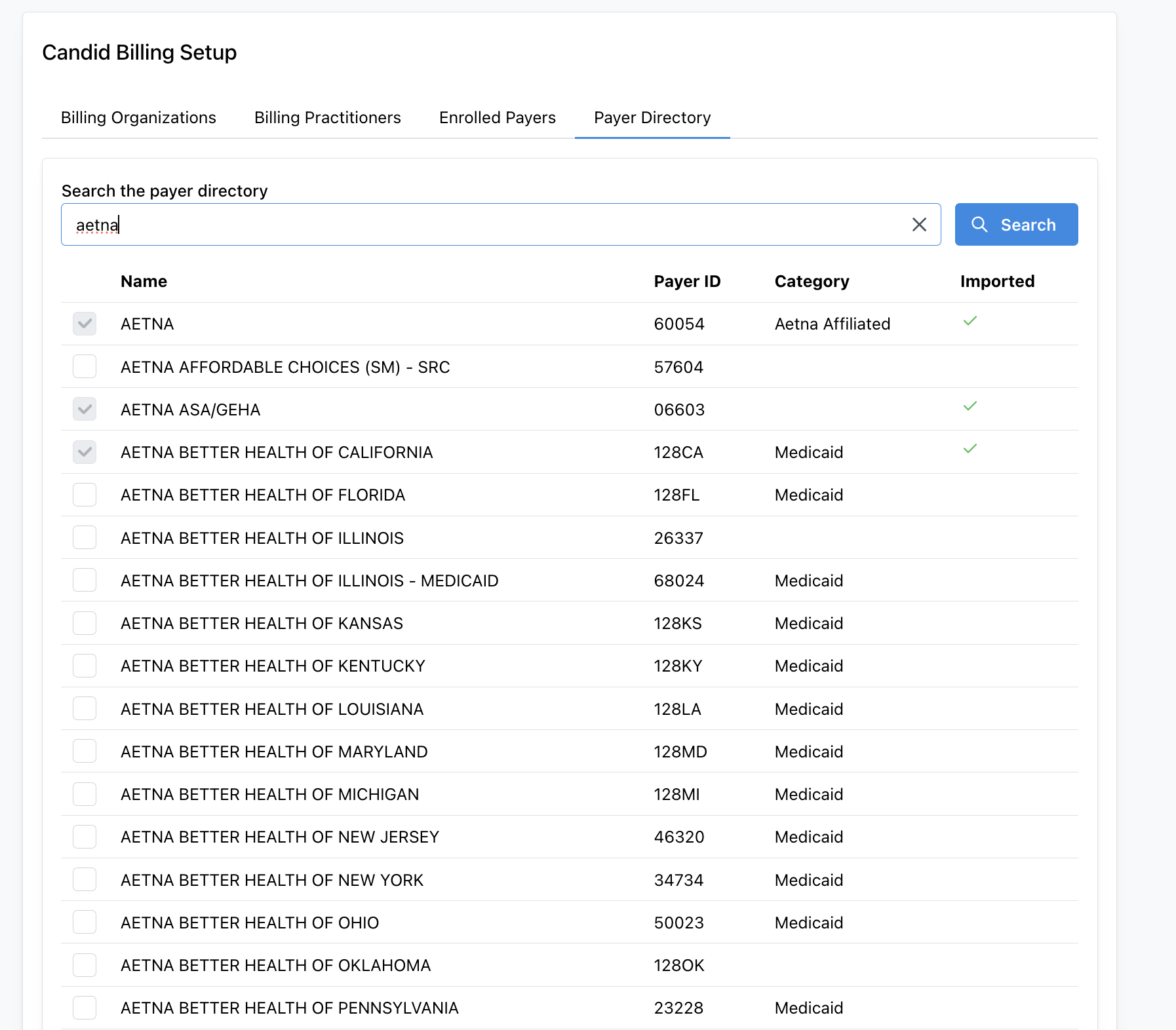
The Payer Directory tab renders the PayerDirectorySearch component. It searches the directory through the candid-get-payers bot and lists each payer's name, claims payer ID, and Candid category. Select payers and click Import selected to save them as Organizations with the identifiers described above. Payers that are already imported show a check mark.
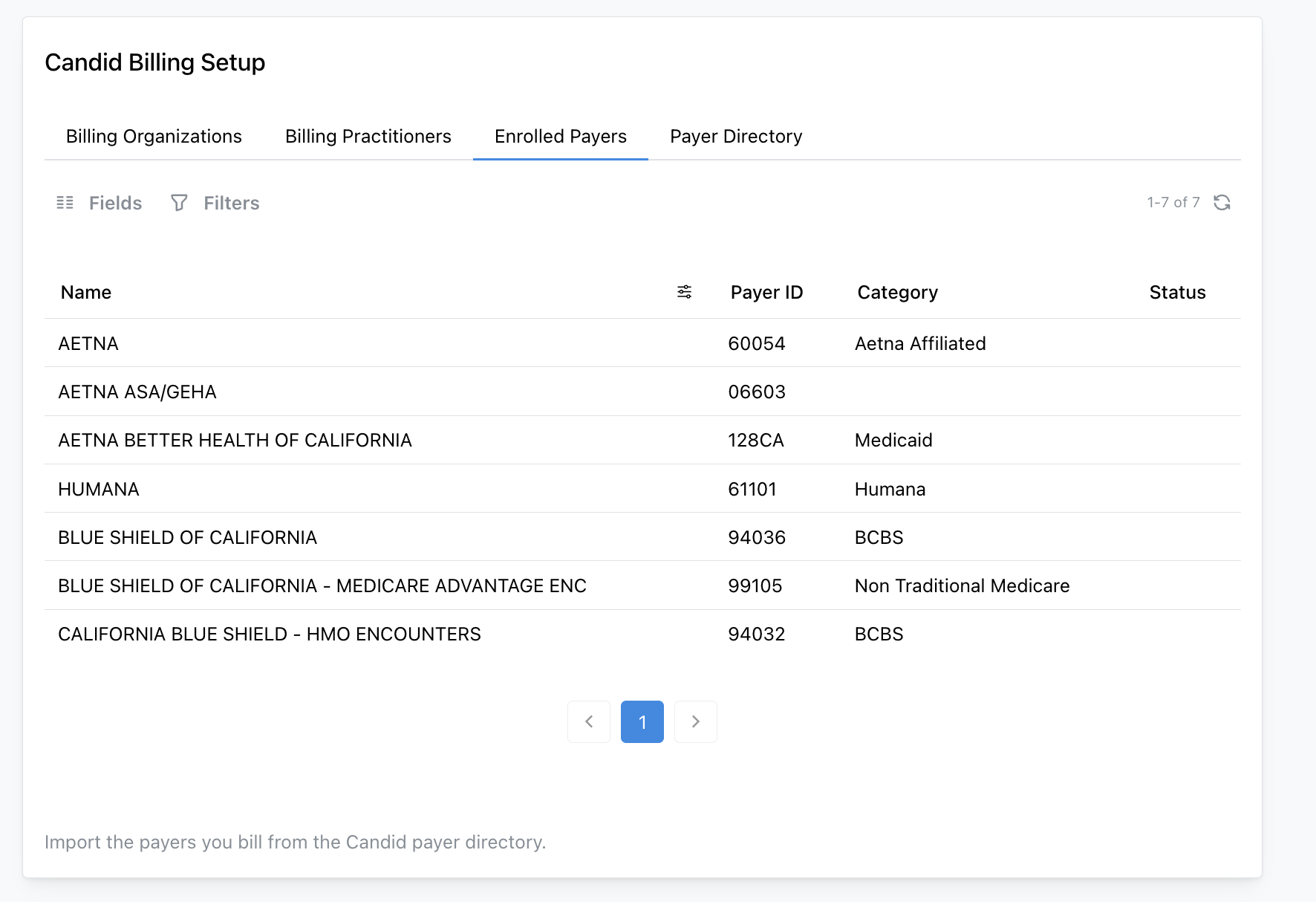
The Enrolled Payers tab renders the ImportedPayerList component, which lists the payer Organizations saved in your project. Open a payer to view its identifiers and clearinghouse support, or refresh it to re-sync from the directory. A payer that has been removed from the directory is marked inactive rather than deleted.
Errors
Missing credentials cause the bot to throw Missing required Candid Health credentials in bot secrets. Candid API failures include the operation and either Candid's named error or the HTTP status and response body. A UUID lookup for a missing payer throws an EntityNotFoundError-based error; a search with no matches returns an empty result instead.