Tenancy Design Decision Guide
Design tenancy for your application built on Medplum.
A tenant is a customer organization or organizational unit that your application treats as a distinct operating context, with defined rules for its data, users, and administration. Tenants can still share selected information and centralized administration.
Companion to the Tenancy Design technical docs.
Work through four questions:
- Do you need a multi-tenant application design? Decide whether this guide applies to you.
- What does a tenant represent? Identify the organization or unit you need to serve separately.
- What must remain independent? Choose how Patient information, clinical records, and administration are shared or separated.
- How should people work across tenants? Choose the sign-in and switching experience for staff and patients.
Plan with this guide
Copy this prompt into your AI agent. It will use this guide and your existing project context, ask about missing requirements, and save decisions for later development. See setup and examples.
Help me plan this part of my Medplum application using this guide:
Tenancy Design Decision Guide
https://www.medplum.com/docs/decision-guides/tenancy-design
Local source, if cloned: medplum-link/packages/docs/content/docs/decision-guides/tenancy-design.md

Follow medplum-link/packages/docs/static/ai/planning.md
(or https://www.medplum.com/ai/planning.md), including its Medplum rules.
Ask before creating or changing my app's project instruction files.

Read my existing requirements and decisions, then ask me about consequential missing requirements; do not invent answers. Save and summarize the decisions in my app's repo before implementation.
1. Do you need a multi-tenant application design?
| Your situation | Example | Next step |
|---|---|---|
| No: One care operation with shared or role-specific access. | Your practice has clinicians, billing staff, and several care teams. | Use one project; choose UI filtering or API restrictions in the Access Control Decision Guide. You can stop here. |
| Yes: Distinct organizations or units need separately governed records or administration. | Your platform serves independent practices. | Continue below to define what stays within each tenant and what may be shared. |
One practice can have several locations, specialties, and care teams while remaining one care operation. Choose multi-tenancy when you need to govern distinct organizations or units separately.
2. What does a tenant represent in your application?
| Tenant represents | Example | Main consequence |
|---|---|---|
| A customer organization | Each independent practice using your software. | Define practice-level sharing, membership, and departure rules. |
| An organizational unit you operate separately | Service lines with distinct data-governance requirements. | Agree which responsibilities and information are independent or shared. |
With or without tenants, a care team may need a focused view or restricted access. UI filtering does not require tenant or care-team assignments: use existing resource fields and relationships to organize work within the user's permitted access. Add care-team policy restrictions when users must be prevented from accessing other patients through the API.
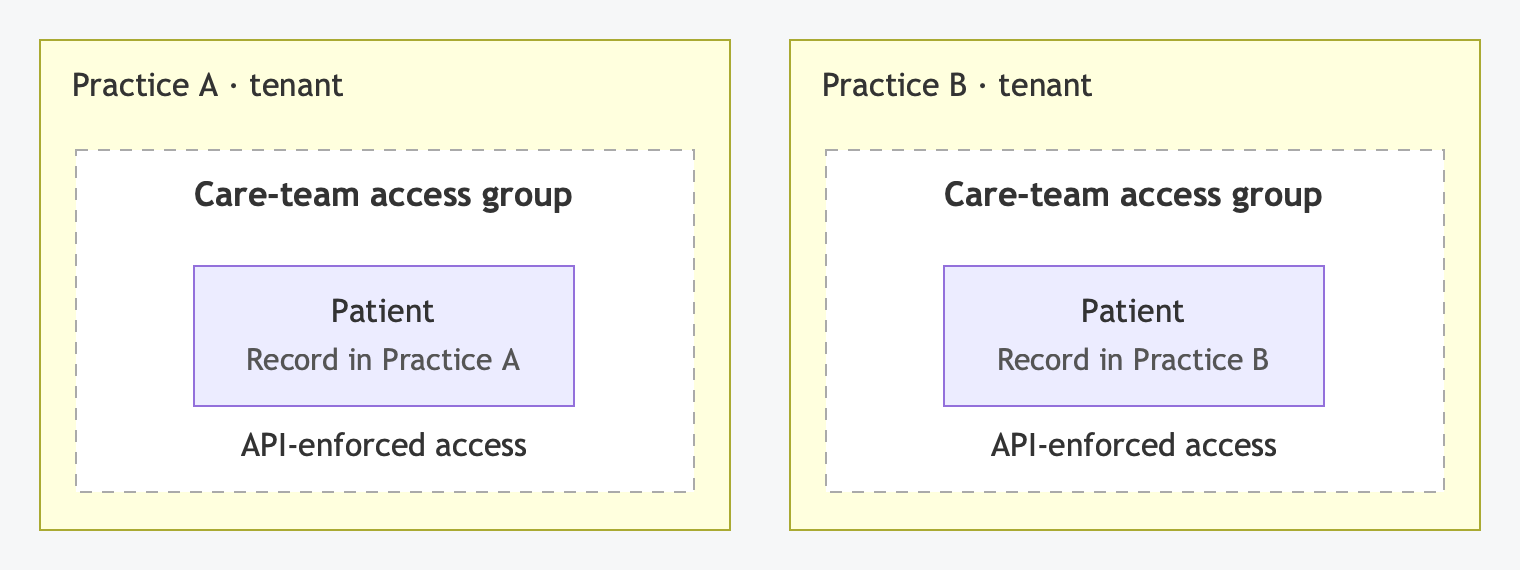 Scroll horizontally to view the full diagram.
Example with API-enforced care-team restrictions within each practice. A practice can also enforce its tenant boundary while using UI filters for care-team views.
For tenant or care-team access, Medplum records group references in meta.accounts and includes them in the computed meta.compartment field. Access policies can match those references. The technical guide explains how to represent these groups and enforce their permissions.
3. What data and administration must remain independent?
Choose the Patient and project model
A project is a Medplum container for resources, user access, and configuration. Within it, the Patient resource holds demographics, contact details, identifiers, and other patient information. Choose whether tenants maintain that Patient information together or independently; choose access to visits, results, and other clinical resources next.
| Option | Example | Functional consequence |
|---|---|---|
| A. One shared Patient record per person, within one project | Your services use centralized registration. | An address correction updates the common Patient record. Clinical records can remain isolated with their own access rules. |
| B. A separate Patient record per tenant, within one project | Each practice maintains its own information about the same person. | An address correction in Practice A leaves Practice B's record unchanged. Project administration remains shared. |
| C. A separate project per tenant | You need separate resource containers and project administration for each customer. | Each project holds its own Patient and clinical resources, memberships, and configuration. Requires self-hosting. |
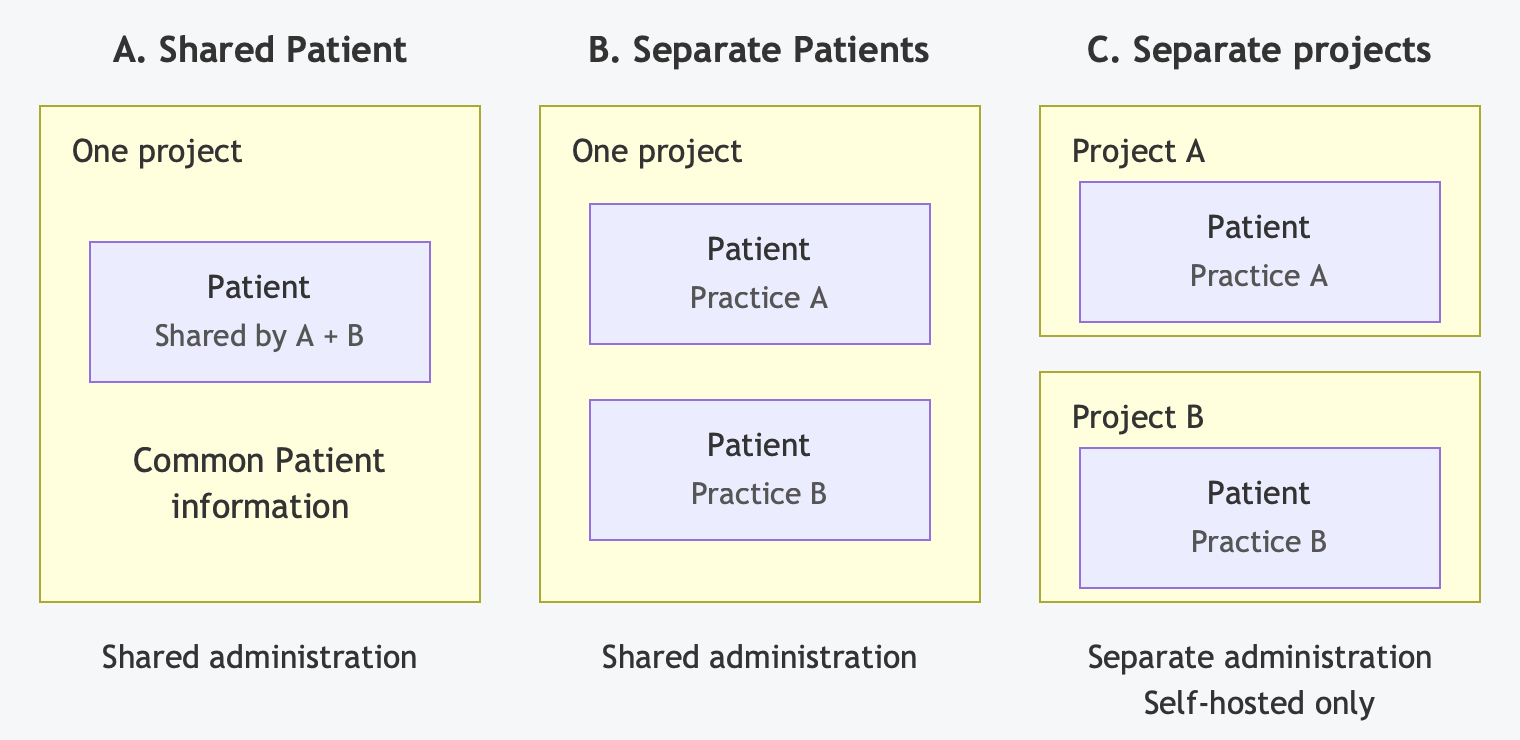 Scroll horizontally to view the full diagram.
Each option shows the same person receiving care from practices A and B. Choose access to their clinical records separately.
For A, agree who maintains the common Patient information. For B, preserve each tenant’s record when matching patients or importing data. A and B share project administration: project administrators can manage access across tenants. C separates project administration and requires setup for each project.
Personally identifiable information (PII) can identify a person. Under HIPAA, protected health information (PHI) generally includes identifiable health, care, or payment information held or transmitted by a covered entity or business associate. Demographics associated with receiving care can be PHI even without diagnoses or clinical notes. Sharing a Patient record can therefore be a PHI-sharing decision while other clinical records remain isolated. See NIST's PII definition and HHS guidance.
Implementation: Patient Records and Clinical Sharing, or Projects for Model C.
Choose clinical sharing separately
| Choice | Example | Main consequence |
|---|---|---|
| Separate records | Services share contact details but keep visits and results separate. | Limit visits and results to the intended tenant, even when Patient information is shared. |
| Selected sharing | A referral package crosses practices. | Define the records, recipients, and duration or exchange rules. |
| Shared chart | Services coordinate around a common chart. | Agree who participates, what they can update, and whether sharing includes historical records. |
With separate projects, your application must coordinate any sharing between them. See Clinical-record isolation.
4. How should people work across tenants?
Choose the experience separately for providers and staff, and patients if a portal is in scope. An account is the identity someone signs in with; a session is their signed-in access to the application. The examples below use practices as tenants.
| Approach | Sign-in and switching experience | Main consequence |
|---|---|---|
| 1. One account, separate practice sessions | Sign in, choose Practice A, and switch to Practice B when needed. Switching need not require another password. | Shared account recovery; each session has its own practice permissions. |
| 2. One account, access across practices | Sign in once and use a practice selector or a combined workspace. | The selector changes the view while the session retains its approved access. Each action needs a clear practice destination. |
| 3. Independent practice accounts | Activate and use a separate account for each practice. | Separate account lifecycles, with more sign-in and account-management work. Password and recovery independence depend on your identity-provider setup. |
For example, providers might switch between practice schedules or work through a combined queue. Patients might select a practice before completing forms or see appointments from both practices in one portal. Choose which experience your users need.
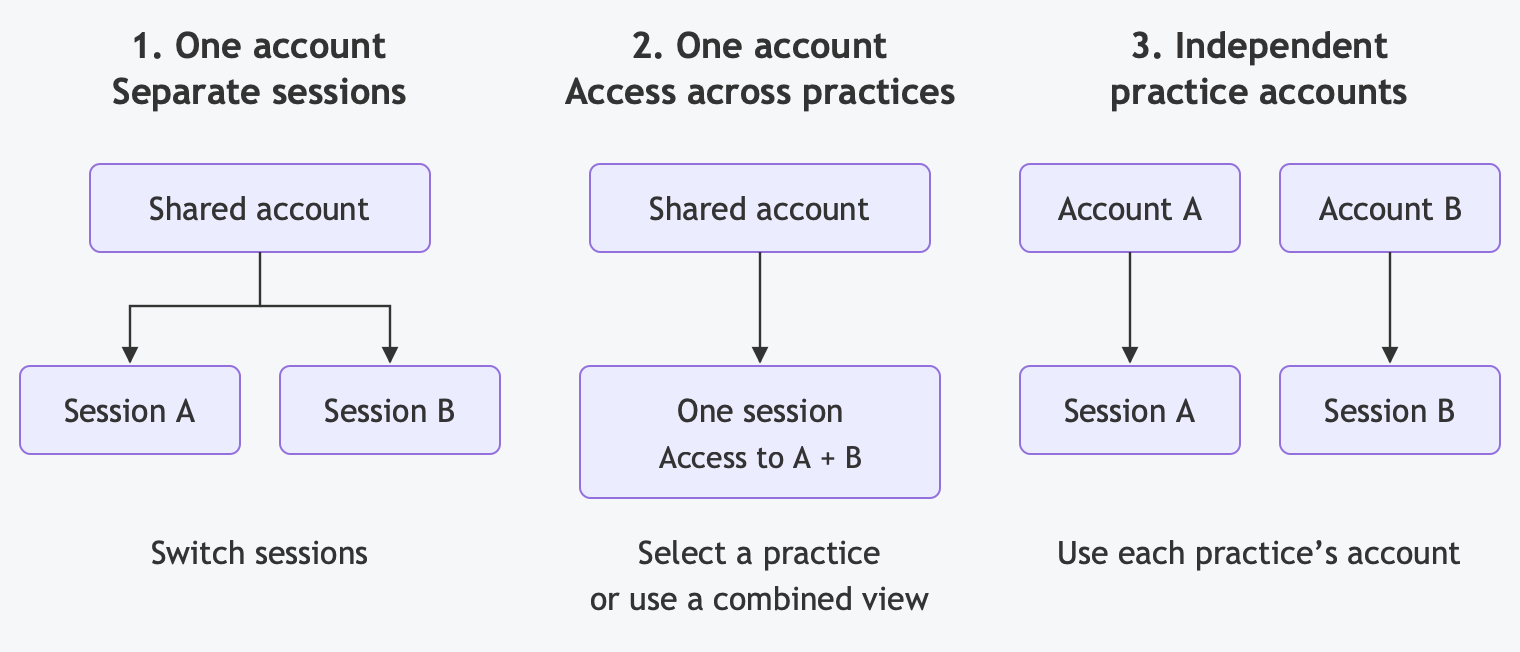 Scroll horizontally to view the full diagram.
Password prompts and recovery depend on your sign-in provider. If separate practice accounts use the same single sign-on (SSO) account, that SSO password and recovery remain shared.
How the data model affects sign-in
All three approaches can use separate Patient records for the same person: one login can reach independently maintained records. With a shared Patient, each practice’s session can still have its own clinical permissions. With separate projects, sign-in and switching must also select the appropriate project; a combined workspace requires additional application work.
Implementation: Identity, Memberships, and Sessions. Choose credential providers and authentication methods in the Authentication Decision Guide.
Before you implement
Record whether you need tenancy, what each tenant represents, the data model, clinical sharing, and account approach for each audience. Also decide what happens to records and access when someone joins another tenant or leaves. See Enrollment and transfers.
Next: Define role permissions in the Access Control Decision Guide, then follow the three implementation paths in Tenancy Design.