Medplum Monthly Update - October 2026

If you will be at HLTH in November, email us at hello@medplum.com and we will find time to connect with the Medplum team.
Medplum v5 earned Drummond Validated FHIRplace Silver status for Coverage Requirements Discovery in both the provider and payer roles, determined October 1. It is the first external validation of the prior authorization work that has been running all year, and it comes with a new CMS-0057-F page laying out which payers the rule touches and when.
October brought 296 commits from 20 contributors, with thirteen patch releases, v5.2.1 through v5.2.13.
Scheduling grew a configuration workspace a practice admin can actually run its calendar from, recurring appointment series through $book and $hold, and blocked time. The Provider App gained draft lab orders and a claim submission path with its own guide. A Project can now be deactivated, archived, and restored.
All of this continues to drive forward our 2026 roadmap priorities.
Features
Scheduling
 Philip Knott,
  Noah Silas, and
  Kevin Shaw
Scheduling was the largest area of the month again. September built the operations; October built the two screens a practice lives in — the workspace the front desk books from, and the configuration workspace the practice admin sets it all up in.
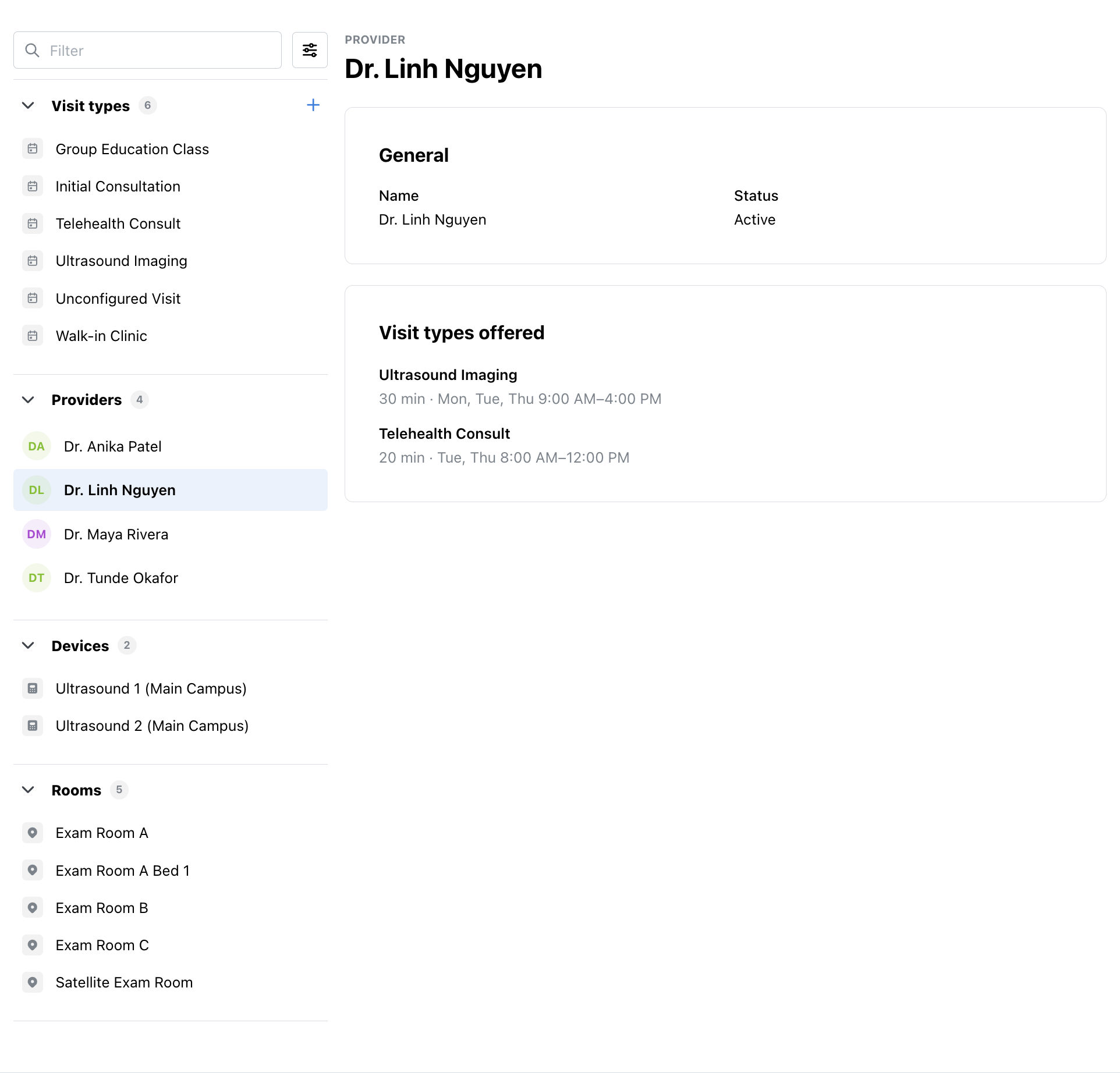
- A configuration workspace — The
SchedulingConfigWorkspaceintroduced in September now lists providers, rooms, and devices beside visit types, each section read independently so one failure does not blank the page. Picking an actor opens its page (Storybook): name, status, the visit types its calendar offers with the duration and hours in effect, its NPIs, its time zone, and the service facilities it works at. Rooms and devices can be created from the sidebar and renamed in place. Providers can be created without an NPI, since a room scheduler and a billing provider are not the same list, and providers the workspace did not create keep their status locked so an admin cannot deactivate aPractitionerthe rest of the system depends on. A provider'sPractitionerRolewrites are worked out from the service facilities chosen rather than hand-edited
- Offering visit types, from either side — A visit type's page shows which providers, rooms, and devices offer it; an actor's page shows every visit type available to offer, filtered and paged so a system with hundreds of visit types does not try to render them at once. Offering and un-offering works from either direction, and un-offering says plainly that existing appointments are not changed
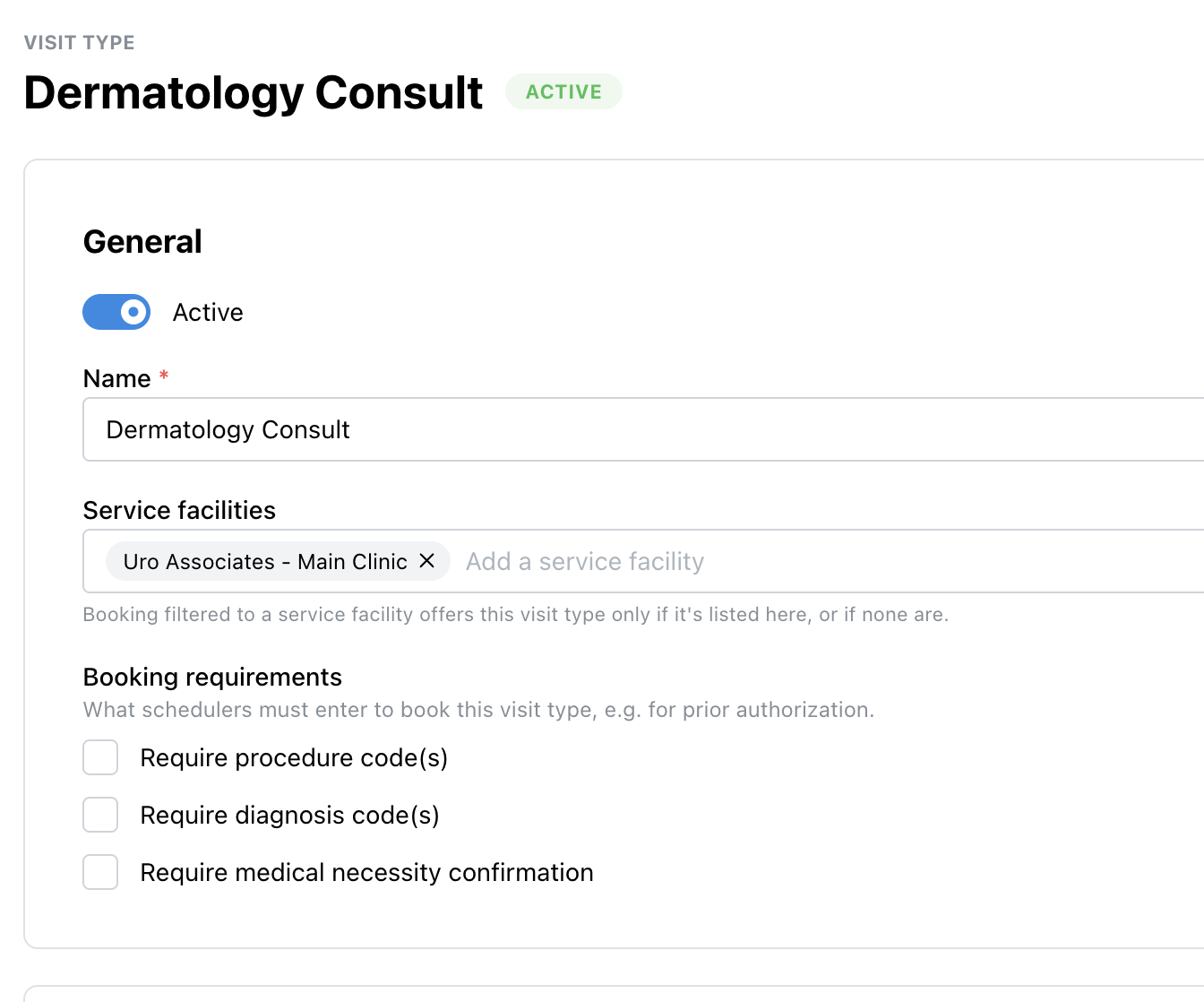
- Booking requirements on a visit type — The
requires-prior-authbehavior from September is now editable: a visit type's page sets whether booking it requires procedure codes, diagnosis codes, or a medical-necessity confirmation, and which service facilities offer it (Storybook)
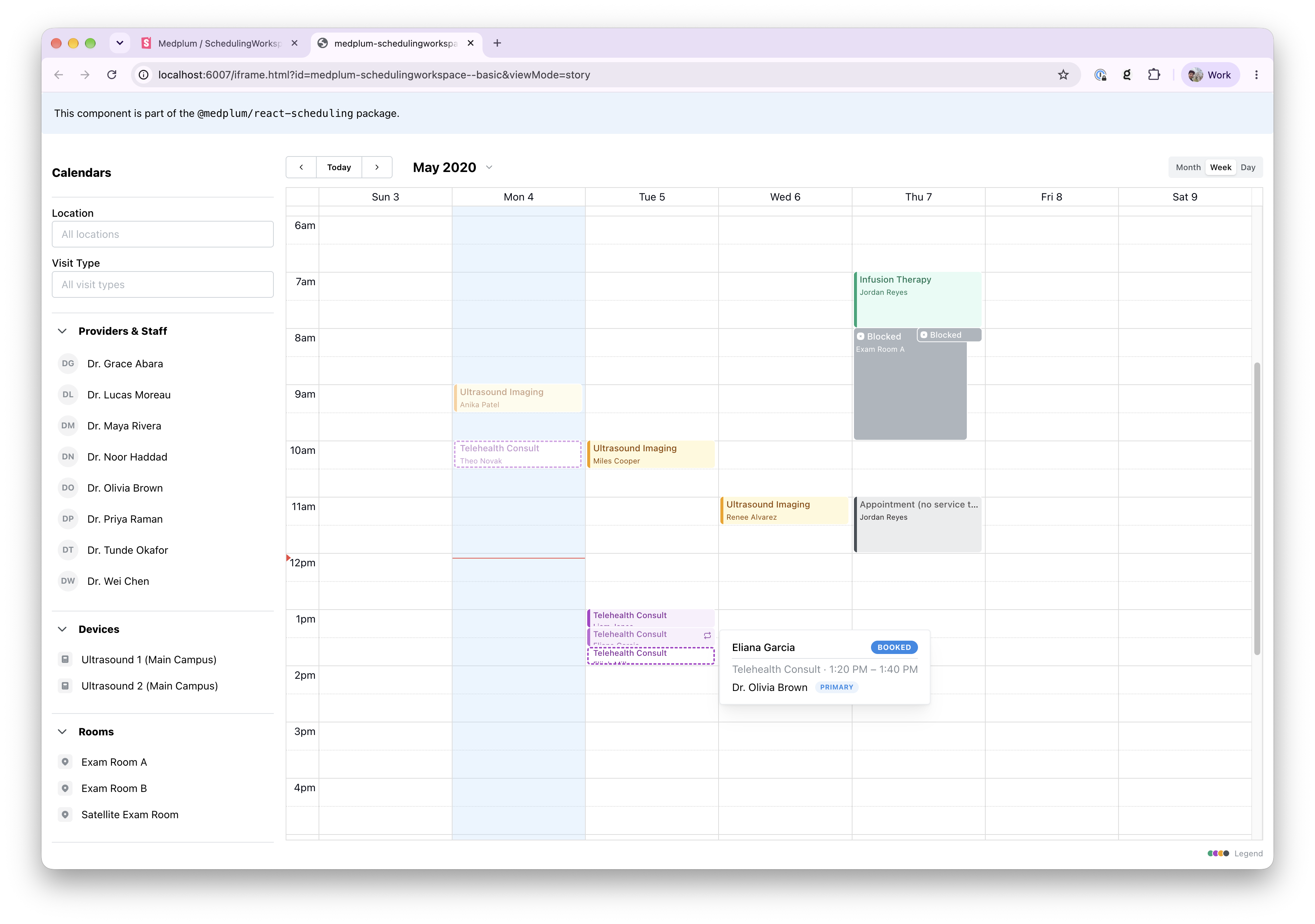
- Recurring series —
$bookand$holdexpand a weeklyrecurrenceTemplatereturned by$findinto every occurrence of the series and book or hold them in one transaction, all or none, each occurrence sharing one series identifier and carrying its R5recurrenceId. The booking form offers a Repeat field of two to six weekly occurrences; the times offered are each a series' first occurrence, and booking one books them all. When$reschedulemoves a single occurrence off the pattern it is marked with R5'soccurrenceChangedas an R4 cross-version extension, and a manual reschedule marks it the same way, so the marker reflects whether the occurrence left the pattern rather than which code path moved it. Recurring appointments are marked on the calendar - Blocked time — Time can be taken off one or more calendars without booking a visit into it. A block form asks for a start and end, the providers, rooms, and devices to block, and an optional comment, and writes a
busySlotover the time on each. Clicking a blockedSlotopens its details beside the calendar, and a management view lists and edits existing blocks. Slots attached to an appointment are not editable this way - A calendar you can read at a glance — Appointments draw as tinted blocks with a color bar,
Slots render as gray foreground events rather than per-schedule colors, free slots are hidden, today's date is circled, the now line and calendar headers were restyled, the selected event is highlighted, and each appointment appears exactly once no matter how many of its actors' calendars are shown. A service type can set its own scheduling color - Getting around — A collapsible Calendars sidebar, a month/year picker, a Today button separated from the previous and next arrows, a time finder that slides in and out with the day selection widget inside it, calendar filters by site and visit type, pill tabs on a shared pane header, and workspace controls moved into the calendar toolbar
- Appointment details — The details pane shows the MRN, the primary provider, the service facility, and the visit type; a pending appointment can be confirmed from it; procedure and diagnosis codes and medical necessity can be edited there; an appointment can be linked to an external system; and notes are written when an appointment is booked or edited. Appointments become read-only twelve hours after they end
- Booking that matches how a front desk works — A provider is no longer required in find-and-book, since a room or a device is sometimes the scarce resource. The visit being booked is drawn as a draft on the calendar, booking answers are kept as the user moves across days, a newly booked appointment is selected and brought on screen, and typing a time books it on one provider per row rather than every alternative. The booking form and its times scroll separately
- Naming —
locationbecame service facility throughout, with a shared input that lists sites by name, and inactive service facilities are left out of the booking pickers
Provider App
 David Yanez,
  Maddy Li, and
  Finn Bergquist
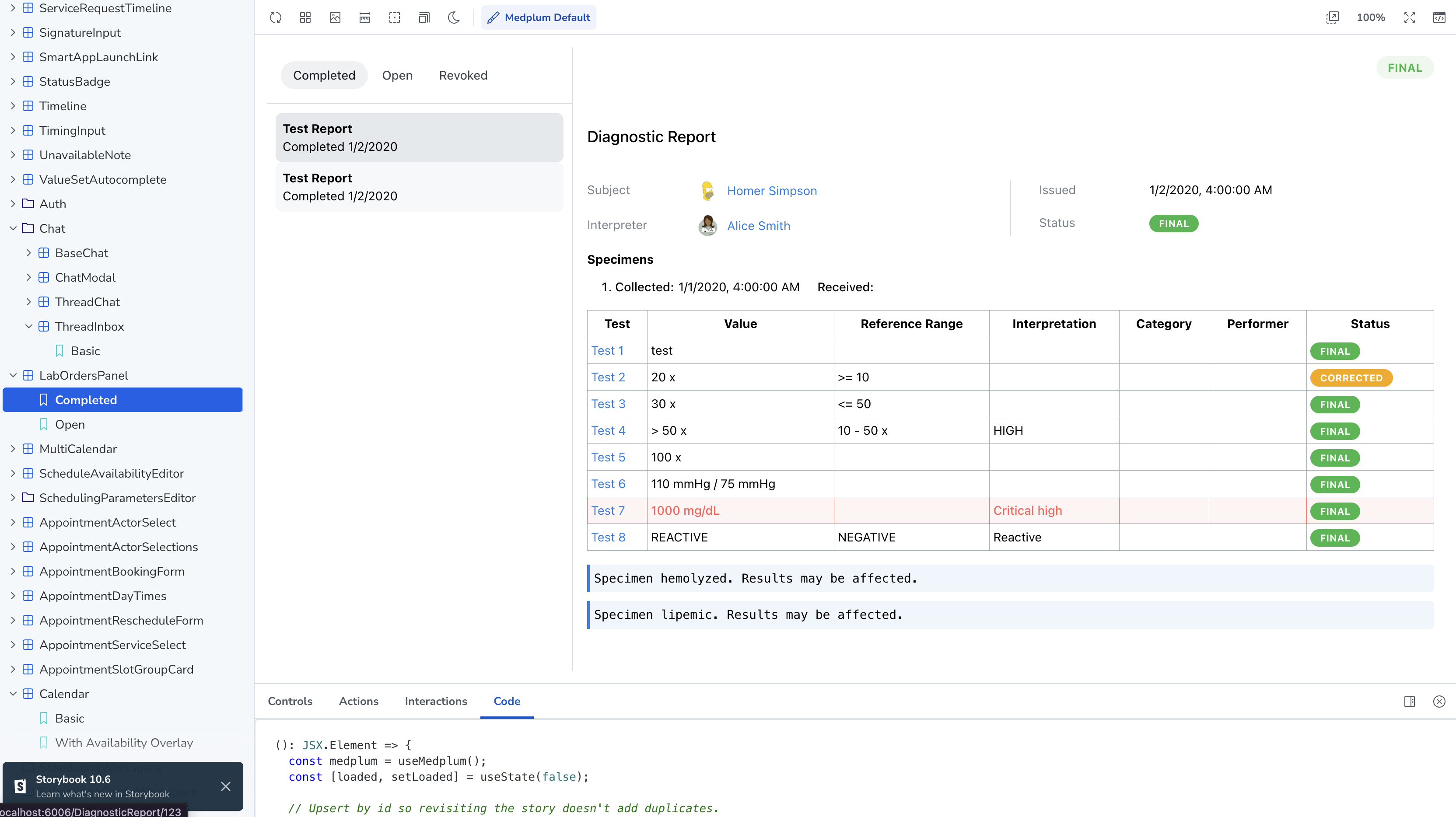
- Lab orders as drafts — An order can be saved as a draft and submitted later, supporting situations where a provider builds the order during the visit and sends it once the specimen is collected. A new
LabOrdersPanelReact component (Storybook) lists completed, open, and revoked orders beside the selected report's results, andObservationvalues keep their original decimal precision where it was preserved on the way in
- Claims — Claims can be submitted from a visit's details and billing tab, with a walkthrough guide and a video covering the flow end to end. The service facility is included on submission, the app checks whether the claim custom operations exist before offering the action rather than failing at submit time, and the get-started flow registers a charge item modifiers
ValueSet - Eligibility — X12 service types can be selected when running an eligibility check, so a check can ask about the benefit category the visit actually falls under instead of general coverage
- Spaces — The conversation pane was extracted from the Spaces inbox and the inbox moved onto the shared list-with-detail layout, so Spaces matches the rest of the app, with a hook for embedding it elsewhere
- Medications — The medications view moved onto
ResourceBoard, giving it the same active, draft, and completed columns the rest of the app uses - Imported records land on the right patient — Importing a SMART Health Link rewrites every
Patientreference in the bundle to the target patient rather than only the first entry, and scopes identifier-based conditional creates to that patient. A bundle can carry onePatientper source system, and the unmatched references were previously saved dangling - Search — Filter UX improvements in
SearchControl, and the menu button is hidden when there is nothing in it
Platform and API
 Cody Ebberson,
  Matt Willer, and
  Matt Long
- Project lifecycle — A
Project.activeflag deactivates a project without deleting it: logins, client credentials, refresh, existing access tokens, basic auth, and external IdP tokens are all rejected, the project is hidden from the picker, subscriptions stop queueing and queued jobs are dropped, and cron bots skip their runs but stay registered so they resume on reactivation. Only super admins can change it, so a project admin cannot lock themselves out. Alongside it,Project/$archiveexports every version of every resource in a project, tombstones included, as per-type NDJSON with ids andmetaintact, and$restoreloads that archive into another Medplum server — the path for moving a project between a hosted and a self-hosted deployment, or handing a customer their data. Both are gated behind a project feature, run on the bulk export queue, and apply the caller's access policy to every version. ThemedplumCLI hasproject archiveandproject restorecommands, and expunging a project now expunges its deleted resources too (Maddy Li, Cody Ebberson) - Bulk export — Exports are queued through restartable BullMQ processing, so a server restart mid-export resumes instead of stranding the job.
_typeFilteris supported for System and Patient export per the Bulk Data IG: each value is parsed and validated before the job starts, so an invalid filter returns a 400 rather than a job that fails later; filters constrain only their named type; and multiple filters on one type are ORed with de-duplication enabled only where it is needed. Group export paginates by resource type and searches large groups in member chunks,OperationDefinitionis excluded, parameters are read from POST bodies and repeated query values, and polling a failed export returns a 400OperationOutcomeinstead of a success shape. See bulk FHIR If-Matchon delete — A FHIR delete honorsIf-Match, so a client can refuse to delete a resource that changed since it read it- Bots —
Bot.rawBodyis honored on$executeand custom operations, not only public webhooks (Finn Bergquist); bot input storage has lifecycle management; running a bot that was never deployed returns a clear error; cron schedules are reloaded in the post-deploy migration; streaming bot responses protect their headers; and bot execution access tokens are cached - Search and terminology — Spec-compliant date range search and
$validateinput handling, a configuration option to restrict chained search,ValueSet/$expandsearchescompose.include.concept.code, and single-resource lookups that match more than one resource are logged - The
medplumCLI —medplum generate-typesgenerates TypeScript interfaces from FHIR profiles, moved out of the internal generator package and into@medplum/coreso it is available to anyone with profiles of their own. The CLI also sends a user agent string, and no longer resumes an expired session during login (Ian Plunkett) - API description — Conditional interactions and OAuth2 are documented in the OpenAPI spec, which is linked from an RFC 9727 API catalog, and
llms.txtwas added to www.medplum.com so coding assistants can find the docs - Smaller changes — FHIR ranges are enforced for
integer,positiveInt, andunsignedInt(Karl Pietrzak), requests sent with an already-aborted signal are not cached (Philip Knott), batch creates honor server-assigned ids only where the spec allows, a missing operation body reads as no parameters, project SMTP transport setup was tightened (Darren Eam), the project list in the account menu scrolls (Karl Pietrzak), radio and checkbox questions are marked unavailable when their value set is missing (Philip Knott), and C-CDA date and time precision is preserved through the FHIR mappings
Enterprise: Scale, Database, and Self-Hosting
Matt Long, Matt Willer, and  Derrick Farris
Enterprise scale work continued toward sharding and spent the rest of the month on query cost:
- Sharding — Shard configuration and sharded test infrastructure landed, super admin endpoints use a shard-aware database pool, resource cache entries are scoped to the shard they were written from, and background job preparation passes a job data context carrying the shard id. Production behavior is unchanged
- Reader routing —
readonlyBatchOnReaderandchainedSearchOnReaderproject settings send read-only batches and chained searches to a reader instance, and resources read from a reader are no longer written into the cache, where replication lag could otherwise make a stale read sticky - Indexes and query cost — A partial filter index on
Encounter, an experimental partial index onTask, reference lookup table rows diffed on write rather than rewritten, an optimizedRepository.searchResources, a first round of optimization on the dispatch job, and delete background jobs deferred until the transaction commits - Static hosting — foomedical.com and provider.medplum.com are served from S3 and CloudFront, with preview deployments on pull requests, and the CDK can pin additional container images to digests at synth time. Blocked email domains are configurable through CDK
- Operations — Centralized background job membership checks, circular reference errors avoided in JSON serialization, dollar signs kept out of log lines, Node bumped in the server image, and Docker Hub pulls authenticated for CI service containers
Integrations
 Oleg Rocklin,
  Darren Eam, and David Yanez
- Claims and clearinghouse — Claim status replays recover a missing source status and preserve history, diagnosis codes keep their exact form rather than being zero-padded, claim facilities are mapped on submission, X12 service types carry display names, and claims submit as the billing practitioner with the facility attached. The eligibility response mapping is shared across both supported processors so service-specific benefit rows survive either path, and address validation errors name the resource that owns the bad address
- Fax — Inbound fax
Communications store the page count and the sender's CSID, so a received fax can be routed and reconciled without opening it - Labs — An order's practice location can be specified and is documented (Finn Bergquist)
- US Core — US Core v6.1.0 (USCDI v3) profiles are loaded (Ian Plunkett)
- Premium integrations on self-hosted — The integrations overview now states which premium integrations are available to self-hosters on an Enterprise plan (Maddy Li)
Compliance
Cody Ebberson, Matt Willer, and Derrick Farris
Compliance had its biggest month of the year:
- FHIRplace Silver for CRD — Medplum v5 is Drummond Validated for Coverage Requirements Discovery in both the provider and payer roles, determined October 1 in the Q3 2026 testing cycle. Validation means confirmed interoperability with multiple partners in a production-representative environment, not a self-attestation
- CMS-0057-F — A new page on the CMS Interoperability and Prior Authorization Final Rule: which payers it applies to, what is required when, where the Da Vinci guides are recommended rather than required, and what Medplum provides. It is deliberately kept separate from HTI-4, which is ONC health IT certification and a different program
Patient/$match— Updated to the CMS patient match specification v3.4.0- Identity and sessions — Refresh tokens are single-use and revoke the chain on reuse, authorization codes expire after ten minutes, setting a password revokes every outstanding login, outstanding password links are retired on a password change or rescope, a rescope to server is rejected when the email is already in use, first-login MFA enrollment honors the project's
allowedMfaMethods, admin MFA and password reset are limited to project-scoped users, and/auth/melists only granted logins as sessions - OAuth2 and clients — The client redirect URI is confirmed before the sign-in form is shown,
ClientApplication.launchUrischemes are validated, SMART scopes are applied to project admin rules, each subscriber's token scopes are applied to WebSocket subscription notifications, and on-behalf-of targets must be an active membership - Project isolation — Presigned storage URLs validate their request path and project, attachment
Binarys in$expungeare limited to the resource's project, DICOM raw files are read with a project-scoped repository, bots are resolved with a project access check and super admin bot creation is scoped to the target project, file system storage paths stay within the base directory, the CORS origin is compared exactly against the app base URL origin, a malformedAccessPolicycriteria fails closed, literal values are escaped in identity lookups, and$deployhas an explicit permission check - Account self-service — Self-service account routes require an unscoped login and tightened input validation, the email API is limited to the documented options, project registration is controlled by a new server config, and blocked email domains are configurable
- Observability for the above — Caller identity on authentication errors, SMART scopes with partial permissions, Google sign-ins whose client ID matches multiple projects, login redirect URIs not registered for the client, unverified email claims from external identity providers, identity provider details on external auth callbacks, and access policy field matches on create are all logged, so the next review has evidence rather than inference
- Code of Conduct — A Code of Conduct was added to the contributing docs (Tim Ray)
Documentation
 Everett Williams,
  Andy Stoneman, and
  Ian Plunkett
Decision guides and workflow docs
- Three new decision guides — Authentication, Care Coordination, and Diagnostic Orders, each with discovery questions and a scoping matrix, plus tweaks to the Access Control guide
- Care coordination — Five new pages behind the decision guide: care plans and goals, teams and delegation, handoffs and escalation, automating workflows, and operational reporting
- Referrals — Four new pages covering recipients and packages, receiving and triage, processing and coordination, and results and closure
Auth and access
- Medplum auth — A first pass at an overall authentication guide, orienting the existing per-flow pages (Andy Stoneman)
- Embedded login — Rendering the sign-in form inside your own application: the same authorization code flow with PKCE, without the redirect
- Project-scoped URLs — What
/projects/{projectId}/changes and the security model behind it (Ian Plunkett)
Everything else
- Building with AI coding assistants — Substantially expanded into an onboarding and planning workflow, with per-guide planning prompts and a project rules setup an agent offers on first use
- Pricing — The pricing page was rebuilt and paid entitlements clarified, with the enterprise page folded into it and the beta label removed from the data warehouse connectors
- Docs search — Algolia's search was replaced with a Kapa chatbot (Maddy Li)
- Reference updates — E-prescribe guide refinement and a documentation refactor (Oleg Rocklin), a warning that subscriptions with
meta.accountsonly fire for matching accounts (Finn Bergquist), and SMART Health Links screenshots
Bug Fixes
getReferenceStringprefers a resource's own type and id over a top-level reference element, so a resource that carries both is referenced correctly (contributed by sarankumar)
Videos
New videos published this month, all on the Medplum YouTube channel.
- Teaching EHR Built on Medplum: a walkthrough of the open-source clinical learning environment described in the An EHR That Teaches post
- Submit Claim to Candid Health: the full claim path in the Provider App, from billing setup to a submitted claim, alongside the guide
- PlumCon 2026 session recordings, posted with the materials: PlumCon 2026 Product Showcase feat Everett Williams, Scaling to 100M Patients - PlumCon 2026 feat Maddy Li, and the community demo Technology That Makes Care More Human | Seen Health
From the Blog
Longer-form writing published this month:
 An EHR That Teaches by Paulius Mui, MD and Misha Manulis — An open-source, AI-enabled clinical learning environment built on Medplum, designed to capture the reasoning behind clinical decisions rather than only the orders, with a walkthrough video
- Medplum Earns Drummond Validated FHIRplace Silver Status for CRD by Cody Ebberson — What Silver CRD validation covers, in both the provider and payer roles, and how it differs from self-attestation
 PlumCon 2026 - Materials & Agenda by Tim Ray — Slides and recordings for every PlumCon session, followed by the community demos
Releases
- v5.2.1 — October 3
- v5.2.2 — October 7
- v5.2.3 — October 8
- v5.2.4 — October 9
- v5.2.5 — October 15
- v5.2.6 — October 17
- v5.2.7 — October 20
- v5.2.8 — October 24
- v5.2.9 — October 26
- v5.2.10 — October 28
- v5.2.11 — October 29
- v5.2.12 — October 29
- v5.2.13 — October 30
Looking Ahead
October expanded the scheduling components with recurring bookings, blocked time, and more configuration options for providers, rooms, and devices. If you are building scheduling on Medplum, we would like to hear if this works out of the box, or if you are missing anything in your workflow.
We are also hiring a Head of Security, a Security Engineer, and a General Counsel. If the Compliance section above reads like the kind of work you want to own, we would like to talk.
Join us on Discord to share feedback or follow along on GitHub. To learn more about anything in this update, or to talk through how it applies to what you are building, contact us at hello@medplum.com.